Description
During the initial reconnaissance, the attacker gathered information about the network infrastructure. We need to identify the vendor of the network device acting as the default gateway in this capture. This information could help us understand if any vendor-specific vulnerabilities were exploited.
Flag Format KCTF{vendor_name}
File Provided (it is the same as for Reconnaissance): pcap1.pcapng
Solution
A way to locate the default gateway is to look at ARP requests.
You’re looking for packets like:
Who has <gateway IP>
<gateway IP> is at aa:bb:cc:dd:ee:ff
When using arp as filter, we will notice what looks like an ARP scan being performed from 192.168.0.1 (That sequential incremental of the Who has <IP address> is not normal):
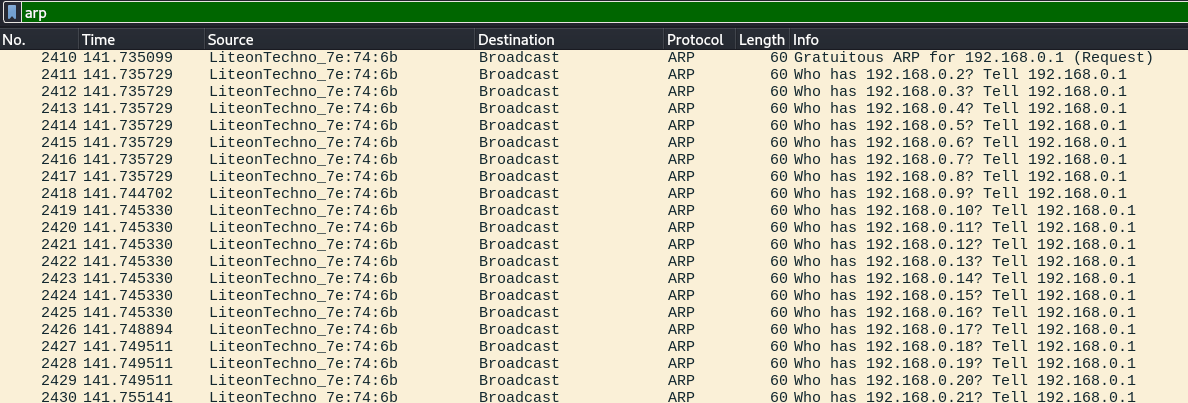
We can discard that traffic as it will just distract us:
arp && !(eth.src==9c:2f:9d:7e:74:6b)
The result contains multiple packets like this:
Who has 192.168.1.100 tell 192.168.1.1
Those have no reply, indicating that 192.168.1.100 is likely not on the network. We can filter out those packets too to further reduce the noise:
arp && !(eth.src==9c:2f:9d:7e:74:6b) && !(arp.dst.proto_ipv4 == 192.168.1.100)
In the result we can see:

The ARP probe is indicating that 192.168.1.101 just joined the network. The ARP probe is basically asking:
“Is anyone already using 192.168.1.101 before I claim it?”
This is to prevent conflicts. Then the host sends the announcement:
“I am now using 192.168.1.101, and my MAC is 38:a2:8c:20:1b:d9”
After that it tries to communicate with 192.168.1.101, and who replies, is our default gateway: 192.168.1.1 with MAC address NetisTechnol_38:d7:a0 (88:bd:09:38:d7:a0). To confirm the name of the company properly I used a MAC lookup online. The MAC is assigned to: Netis Technology.
Flag: KCTF{Netis_Technology}