Description
Scenario: A mid-sized e-learn company “Knight Blog” recently detected suspicious network activity on their infrastructure. As the lead forensic analyst for the Knight Security Response Team, you’ve been called in to investigate. The IT team has provided you with three packet captures taken at different stages of what appears to be a coordinated cyber attack. Your mission is to analyze these captures, trace the attacker’s footsteps, and uncover the full scope of the breach.
Question: Our IDS flagged some suspicious scanning activity in the first capture. The attacker was probing our network to identify potential entry points. Analyze the traffic and determine how many ports were found to be open on the target system.
File Provided: pcap1.pcapng
Solution
first, we can use the filter tcp.flags.syn == 1 to locate the port scan:
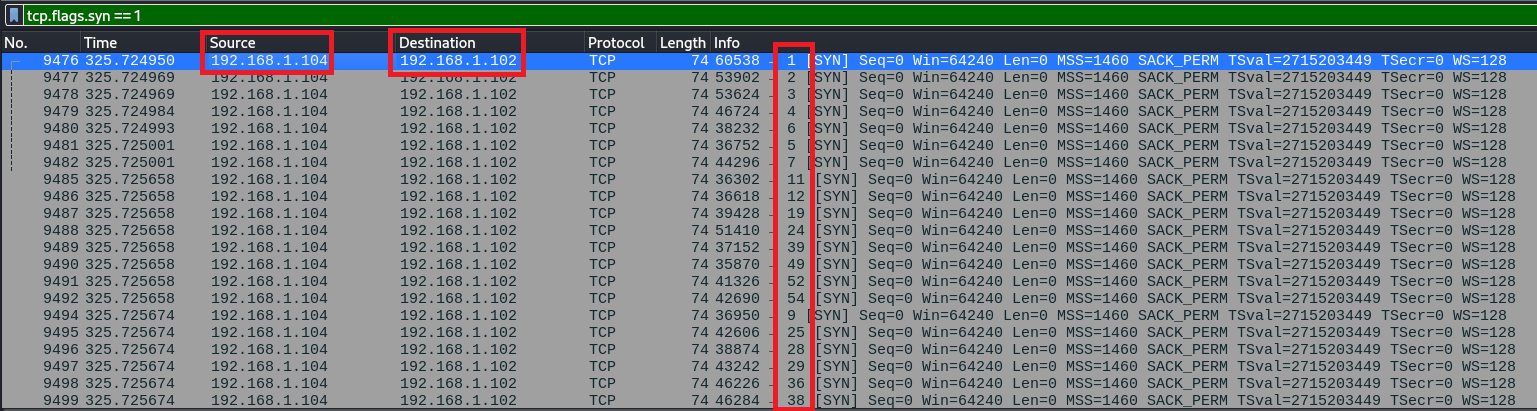
It is clear that the host doing the port scan was 192.168.1.104 and the target was 192.168.1.102. If a port is open the target will reply with a SYN/ACK, so we can use the following filter to locate those packets: tcp.flags.syn == 1 && tcp.flags.ack == 1 && ip.src == 192.168.1.102 && ip.dst == 192.168.1.104
Using that filter will show that TCP ports 22 and 80 were opened.
As there was some UDP traffic in the capture, I wanted to discard the possibility that there was a UDP scan also that could have detected additional open ports. I used this filter (UDP traffic from the attacker IP):
udp && ip.src == 192.168.1.104
There were no packets, so the answer is 2 ports.
Flag: KCTF{2}