Going in Reverse
The full write-up for this challenge is located at Going in Reverse. The file provided (login.bas) is written in BASIC using the QBASIC syntax. Although it is not required to solve the challenge, you can install FreeBASIC, compile the program, and run it. I have included instructions on how to do this here:
https://github.com/gmanctf/2025-HHC/blob/main/Going%20in%20Reverse/README.md
That repository also contains a detailed, line-by-line explanation of what the code does.
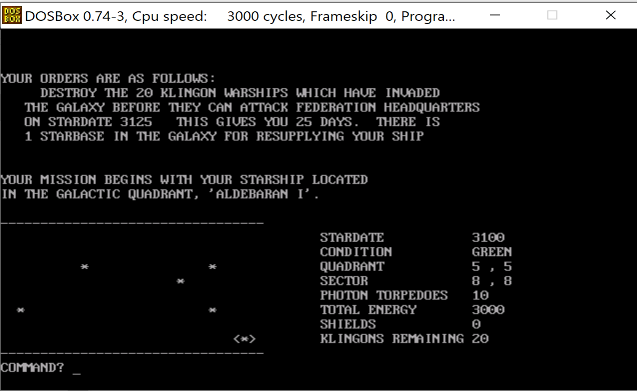
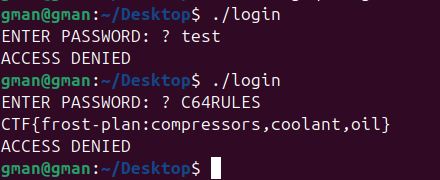
The screenshot below shows an example of the program being executed:
Retro Recovery
Alternative Solution
The solution provided in Retro Recovery uses strings to solve the challenge. However, I wanted to do it the “proper” way: mounting the floppy disk, recovering the deleted file, and then extracting the flag.
Let’s start by inspecting the file:
fdisk -l floppy.img
Disk floppy.img: 1.41 MiB, 1474560 bytes, 2880 sectors
Units: sectors of 1 * 512 = 512 bytes
Sector size (logical/physical): 512 bytes / 512 bytes
I/O size (minimum/optimal): 512 bytes / 512 bytes
Disklabel type: dos
Disk identifier: 0x00000000
Next, identify the filesystem:
file floppy.img
floppy.img: DOS/MBR boot sector, code offset 0x3c+2, OEM-ID "mkfs.fat", root entries 224, sectors 2880 (volumes <=32 MB), sectors/FAT 9, sectors/track 18, reserved 0x1, serial number 0x9c01e8ae, unlabeled, FAT (12 bit), followed by FAT
The output of these commands tells us that we are dealing with a raw FAT12 filesystem (no partitions) that starts at sector 0, which is exactly what we would expect for a floppy disk. We can mount it as follows:
sudo mount -o ro,loop floppy.img /mnt/
If we inspect the contents, we see the following:
└─$ ls /mnt
qb45
└─$ ls /mnt/qb45
BC.EXE  BRUN45.EXE  LIB.EXE  LINK.EXE  MOUSE.COM  PACKING.LST.txt  QB.EXE  QB.INI
Let’s stop here for a second. These files are gold! They are the original Microsoft QuickBASIC version 4.5 (released in 1988). However, the flag is not there. This comment from Mark suggests there is a deleted file we need to recover:
“The beauty of file systems is that ‘deleted’ doesn’t always mean gone forever”
Let’s explore the floppy disk with Sleuth Kit:
fls -r -d floppy.img
r/r * 6:        all_i-want_for_christmas.bas
r/r * 10:       .all_i-want_f
We can see 2 deleted files. We can use icat to recover them:
icat floppy.img 6 > all_i-want_for_christmas.bas
icat floppy.img 10 > .all_i-want_f
Now let’s check what type of files they are:
└─$ file all_i-want_for_christmas.bas
all_i-want_for_christmas.bas: ASCII text

└─$ file .all_i-want_f
.all_i-want_f: Nano swap file, pid 4209, user mark, host arcade, file all_i-want_for_christmas.bas, modified

└─$ strings .all_i-want_f
b0nano 7.2
mark
arcade
all_i-want_for_christmas.bas
all_i-want_for_christmas.bas is a text file. .all_i-want_f is a recovery file created by nano when editing a file. From this, we can see that the user mark was editing all_i-want_for_christmas.bas on the host arcade. So what was Mark editing? I used the comments at the beginning of the file to try to find the original one:
1 REM original file superstartrek.bas dated 2/13/2009 from bcg.tar.gz
2 REM QBasic conversion by WTN...
3 REM 2/16/2021 - uncrunched, changed B9=2 to B9=0, added RANDOMIZE and SLEEP
4 REM incorporated instructions from superstartrekins.bas
5 REM 2/19/2021 - changed the code after DO YOU NEED INSTRUCTIONS?
10 REM SUPER STARTREK - MAY 16,1978 - REQUIRES 24K MEMORY
I wasn’t able to find the exact same version, but I did locate the original game here:
http://vintage-basic.net/bcg/superstartrek.bas
Using diff to compare the files made identifying the added content (and therefore the flag) much easier:
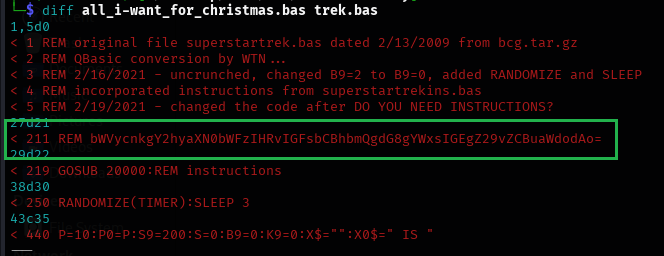
As with the original solution, decoding the base64 string reveals the flag: merry christmas to all and to all a good night
Playing the game
As mentioned earlier, the qb45 folder contains the original Microsoft QuickBASIC 4.5. There are modern implementations you can use to compile QuickBASIC programs (e.g. https://qb64.com/ or the method I used for login.bas in Going in Reverse). QuickBASIC 4.5 will not natively run on modern versions of Windows, but I’m doing this side tasks for fun and learning as much as possible, so let’s make it run. We will need a 16-Bit DOS emulator, for example DOSBox. Install it and run DOSBox. You will need to mount the folder where you have qb45 first:
mount c c:\qb45
C:
qb.exe
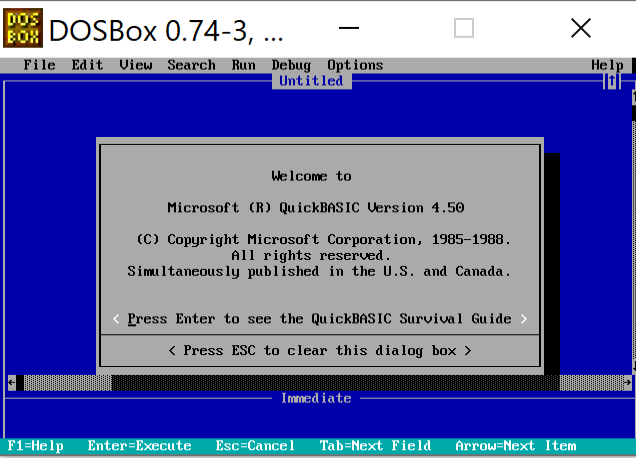
Beautiful! Now, let’s run the game. Copy all_i-want_for_christmas.bas into a folder and mount it in DOSBox or (or place it directly into the qb45 folder—remember to remount if you do). Launch QuickBASIC. Press ESC, then File, Open Program..., select the file with the game. This will load the code. Now click Run, Start. Enjoy the game: