👨💻 Challenge provided by: Evan Booth
🗺️ Location: The Neighborhood - Area: City. Coordinates: 19, 12
 Challenge URL: On the Wire
Challenge Description
Help Evan next to city hall hack this gnome and retrieve the temperature value reported by the I²C device at address 0x3C. The temperature data is XOR-encrypted, so you’ll need to work through each communication stage to uncover the necessary keys. Start with the unencrypted data being transmitted over the 1-wire protocol.
Hints
Protocols
**Key concept - Clock vs. Data signals:**

- Some protocols have separate clock and data lines (like SPI and I2C)
- For clocked protocols, you need to sample the data line at specific moments defined by the clock
- The clock signal tells you _when_ to read the data signal

**For 1-Wire (no separate clock):**

- Information is encoded in pulse widths (how long the signal stays low or high)
- Different pulse widths represent different bit values
- Look for patterns in the timing between transitions

**For SPI and I2C:**

- Identify which line is the clock (SCL for I2C, SCK for SPI)
- Data is typically valid/stable when the clock is in a specific state (high or low)
- You need to detect clock edges (transitions) and sample data at those moments

**Technical approach:**

- Sort frames by timestamp
- Detect rising edges (0→1) and falling edges (1→0) on the clock line
- Sample the data line's value at each clock edge
On Rails
**Stage-by-stage approach**

1. Connect to the captured wire files or endpoints for the relevant wires.
2. Collect all frames for the transmission (buffer until inactivity or loop boundary).
3. Identify protocol from wire names (e.g., `dq` → 1-Wire; `mosi`/`sck` → SPI; `sda`/`scl` → I²C).
4. Decode the raw signal:
    - Pulse-width protocols: locate falling→rising transitions and measure low-pulse width.
    - Clocked protocols: detect clock edges and sample the data line at the specified sampling phase.
5. Assemble bits into bytes taking the correct bit order (LSB vs MSB).
6. Convert bytes to text (printable ASCII or hex as appropriate).
7. Extract information from the decoded output — it contains the XOR key or other hints for the next stage.

8. Repeat Stage 1 decoding to recover raw bytes (they will appear random).
9. Apply XOR decryption using the key obtained from the previous stage.
10. Inspect decrypted output for next-stage keys or target device information.

- Multiple 7-bit device addresses share the same SDA/SCL lines.
- START condition: SDA falls while SCL is high. STOP: SDA rises while SCL is high.
- First byte of a transaction = (7-bit address << 1) | R/W. Extract address with `address = first_byte >> 1`.
- Identify and decode every device’s transactions; decrypt only the target device’s payload.

- Print bytes in hex and as ASCII (if printable) — hex patterns reveal structure.
- Check printable ASCII range (0x20–0x7E) to spot valid text.
- Verify endianness: swapping LSB/MSB will quickly break readable text.
- For XOR keys, test short candidate keys and look for common English words.
- If you connect mid-broadcast, wait for the next loop or detect a reset/loop marker before decoding.

- Buffering heuristic: treat the stream complete after a short inactivity window (e.g., 500 ms) or after a full broadcast loop.
- Sort frames by timestamp per wire and collapse consecutive identical levels before decoding to align with the physical waveform.
Bits and Bytes
**Critical detail - Bit ordering varies by protocol:**

**MSB-first (Most Significant Bit first):**

- SPI and I2C typically send the highest bit (bit 7) first
- When assembling bytes: `byte = (byte << 1) | bit_value`
- Start with an empty byte, shift left, add the new bit

**LSB-first (Least Significant Bit first):**

- 1-Wire and UART send the lowest bit (bit 0) first
- When assembling bytes: `byte |= bit_value << bit_position`
- Build the byte from bit 0 to bit 7

**I2C specific considerations:**

- Every 9th bit is an ACK (acknowledgment) bit - ignore these when decoding data
- The first byte in each transaction is the device address (7 bits) plus a R/W bit
- You may need to filter for specific device addresses

**Converting bytes to text:**

String.fromCharCode(byte_value) // Converts byte to ASCII character
Garbage?
**If your decoded data looks like gibberish:**

- The data may be encrypted with XOR cipher
- XOR is a simple encryption: `encrypted_byte XOR key_byte = plaintext_byte`
- The same operation both encrypts and decrypts: `plaintext XOR key = encrypted`, `encrypted XOR key = plaintext`

**How XOR cipher works:**

javascript
function xorDecrypt(encrypted, key) {
  let result = "";
  for (let i = 0; i < encrypted.length; i++) {
    const encryptedChar = encrypted.charCodeAt(i);
    const keyChar = key.charCodeAt(i % key.length);  // Key repeats
    result += String.fromCharCode(encryptedChar ^ keyChar);
  }
  return result;
}

**Key characteristics:**

- The key is typically short and repeats for the length of the message
- You need the correct key to decrypt (look for keys in previous stage messages)
- If you see readable words mixed with garbage, you might have the wrong key or bit order

**Testing your decryption:**

- Encrypted data will have random-looking byte values
- Decrypted data should be readable ASCII text
- Try different keys from messages you've already decoded
References
1-Wire Implementation
Basics of the SPI Communication Protocol
Basics of the I2C Communication Protocol
Solution
When we connect to the challenge URL, we are presented a logic analyzer implemented in software. We can select one of the 3 serial protocols we need to read on the top menu:
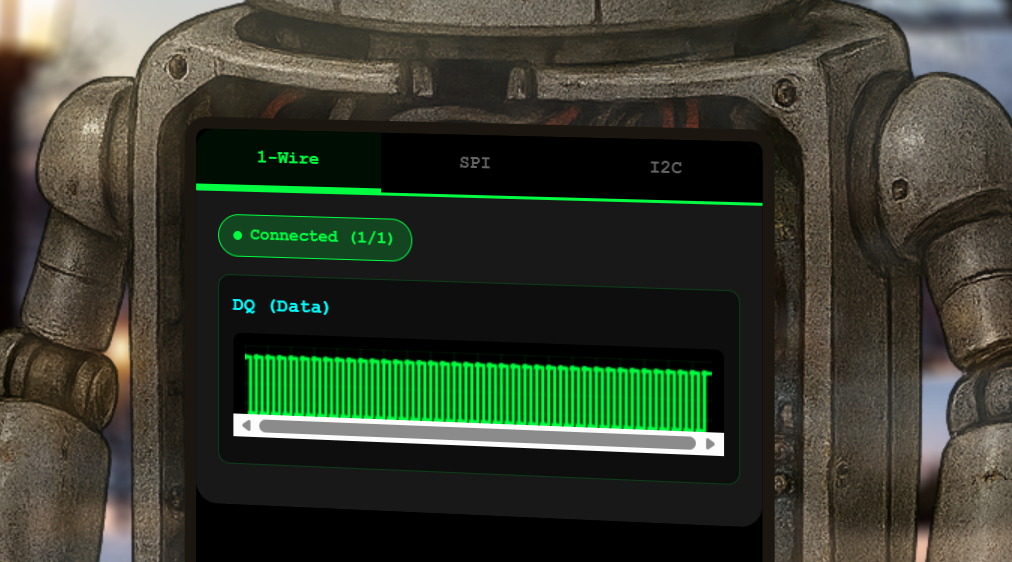
Selecting each of the protocols triggers a GET request to /wire/dq (for 1-Wire), /wire/mosi and /wire/sck (for SPI), and /wire/scl and /wire/sda for I2C. The data is sent by the server using Web Sockets.
Step 1 - 1-Wire Protocol
1-Wire is a single-wire, low-speed, half-duplex serial protocol typically used to communicate with small inexpensive devices such as digital thermometers and weather instruments. It operates over a single data line, without clock signal (which is why we are provided only one signal as opposed to the other 2 protocols, where a clock signal is present).
Below are some samples of the Web Socket packets the server returns when we connect to the 1-Wire protocol:
{"type":"welcome","wire":"dq","message":"Connected to dq wire. Broadcasting continuously every 2000ms..."}
{"line":"dq","t":0,"v":1,"marker":"idle"}
{"line":"dq","t":1,"v":0,"marker":"reset"}
{"line":"dq","t":481,"v":1}
{"line":"dq","t":551,"v":0,"marker":"presence"}
{"line":"dq","t":701,"v":1}
{"line":"dq","t":941,"v":0}
{"line":"dq","t":1001,"v":1}
{"line":"dq","t":1011,"v":0}
..."line":"dq"- indicates this is Data (D) line data from the 1-Wire protocol"t":481- timestamp in nanoseconds"v":1- value (1 = high, 0 = low)
To extract the binary data you need to:
- Identify bit slots (each ~60 µs long).
- Sample once per slot (around 15 µs after the master pulls low).
- Record that as the bit value (0 or 1).
So the algorithm should be:
- Detect when the master starts a slot (line goes low).
- Look at the line state ~15 µs later:
- If still low → bit = 0
- If high → bit = 1
- Move to the next slot.
In order to inspect the data more closely and understand it better, I first made a script to collect all the packets and saved them locally in a file called dq.csv. I then tested my implementation using the file until I managed to make a script to read the data:
import pandas as pd

def decode_onewire_slots(df, slot_length=60, sample_point=15):
    """
    Decode 1-Wire by sampling once per slot.
    df: DataFrame with columns 't' (time) and 'v' (line state)
    slot_length: expected slot duration in microseconds
    sample_point: when to sample within the slot
    """
    bits = []
    t = df["t"].values
    v = df["v"].values

    i = 0
    while i < len(t):
        # Find start of slot (line goes low)
        if v[i] == 0:
            slot_start = t[i]
            # Find sample time
            sample_time = slot_start + sample_point
            # Find closest entry to sample_time
            j = (abs(t - sample_time)).argmin()
            bits.append(v[j])  # 0 or 1 at sample point
            # Skip ahead roughly one slot
            while i < len(t) and t[i] < slot_start + slot_length:
                i += 1
        else:
            i += 1

    # Group into bytes (LSB first)
    bytes_out = []
    for k in range(0, len(bits), 8):
        byte_bits = bits[k:k+8]
        if len(byte_bits) < 8:
            break
        value = sum(b << j for j, b in enumerate(byte_bits))
        bytes_out.append(value)

    return bits, bytes_out

def bytes_to_ascii(bytes_out):
     """
     Convert a list of byte values into an ASCII string.
     Non-printable bytes are skipped.
     """
     chars = []
     for b in bytes_out:
         if 32 <= b <= 126:   # printable ASCII range
             chars.append(chr(b))
         else:
             chars.append('.')  # placeholder for non-printable
     return ''.join(chars)


df = pd.read_csv("dq.csv")

bits, bytes_out = decode_onewire_slots(df)

#convert to ASCII
ascii_text = bytes_to_ascii(bytes_out)
print("ASCII Output:", ascii_text)
Running the script gave me the following output:
ASCII Output: 0.....................LA%....................`=I..........,W.F...F.BV6&..G.B.V.2..."V7.B.F..R7..v.B.V...$..V....6...\Y..H....Y..\.....Z...T..X...Y.].H.\.....Z......ZY..H.X..read and decrypt the SPI bus data using the XOR key: icy0.....................LA%....................`=I..........,W.F...F.BV6&..G.B.V.2..."V7.B.F..R7..v.B.V...$..V....6...\Y..H....Y..\.....Z...T..X...Y.].H.\.....Z......ZY..H.X..read and decrypt the SPI bus data using the XOR key: icy0.....................LA%....................`=I..........,W.F...F.BV6&..G.B.V.2..."V7.B.F..R7..v.B.V...$..V....6...\Y..H....Y..\.....Z...T..X...Y.].H.\.....Z......Z
The reason the data is repeated is because the same data is sent repeatedly. You can notice this by inspecting the data because the time (t) goes back to 0 after 32871 ns (last packet is {"line":"dq","t":32871,"v":1}.
The XOR key for SPI is: icy
Step 2 - SPI Protocol
The SPI (Serial Peripheral Interface) is a synchronous serial protocol. It is typically used for short-distance communication between a microcontroller and peripherals in embedded systems, like memory (SD cards, EEPROMs, Flash) and displays (LCD, OLED).
SPI uses the following lines:
- SCK → Clock
- MOSI → Master Out, Slave In
- MISO → Master In, Slave Out (optional)
- CS/SS → Chip Select (optional)
In our case, we are provided with MOSI and SCK only and this is the first few packets we see for each:
{"type":"welcome","wire":"mosi","message":"Connected to mosi wire. Broadcasting continuously every 2000ms..."}
{"line": "mosi", "t": 0, "v": 0, "marker": "idle-low"}
{"line": "mosi", "t": 0, "v": 0, "marker": "data-bit"}
{"line": "mosi", "t": 10000, "v": 0, "marker": "data-bit"}
{"line": "mosi", "t": 20000, "v": 0, "marker": "data-bit"}
{"line": "mosi", "t": 30000, "v": 1, "marker": "data-bit"}{"type":"welcome","wire":"sck","message":"Connected to sck wire. Broadcasting continuously every 2000ms..."}
{"line": "sck", "t": 0, "v": 0, "marker": "idle-low"}
{"line": "sck", "t": 5000, "v": 1, "marker": "sample"}
{"line": "sck", "t": 10000, "v": 0}
{"line": "sck", "t": 15000, "v": 1, "marker": "sample"}
{"line": "sck", "t": 20000, "v": 0}
{"line": "sck", "t": 25000, "v": 1, "marker": "sample"}
{"line": "sck", "t": 30000, "v": 0}The fact that the packet says "marker": "idle-low" is a likely indication that the bus is operating in SPI Mode 0 (CPOL=0, CPHA=0) (sample on rising edge). To get the data we need to:
- Iterate over all
sckentries with"marker":"sample". - For each sample time
t, find the latest MOSI value at or beforet. - Collect those values as bits.
- Group bits into bytes using MSB first.
As with 1-Wire, I started by collecting all packets using a script (spi-capture.py). This time, I detected the start and end of the stream. The output of running the script was sck.json and mosi.json. From there, I built the following script that uses both json files with the signals as input, merges them, decodes the SPI data, and finally uses XOR with the key icy to obtain the plaintext data:
python3 spi-decoder.py sck.json mosi.json
#!/usr/bin/env python3
import sys
import json
import pandas as pd

def load_json(path):
    """Load JSON file"""
    entries = []
    with open(path, "r") as f:
        for line in f:
            if line.strip():
                entries.append(json.loads(line))
    return entries

def merge_signals(sck_file, mosi_file):
    """Merge SCK and MOSI JSON files into a single DataFrame."""
    sck = load_json(sck_file)
    mosi = load_json(mosi_file)
    merged = sck + mosi
    merged.sort(key=lambda x: (x["t"], x["line"]))
    return pd.DataFrame(merged)

def decode_spi(df, bits_per_word=8):
    """
    Decode SPI MOSI stream from merged signal DataFrame.
    Uses SPI Mode 0 (sample on rising edge), MSB first.
    """
    # Separate clock and data
    sck_samples = df[(df["line"] == "sck") & (df["marker"] == "sample")]
    mosi_data   = df[(df["line"] == "mosi") & (df["marker"] == "data-bit")]

    bits = []
    for _, s in sck_samples.iterrows():
        t = s["t"]
        # Find latest MOSI value at or before this time
        mosi_row = mosi_data[mosi_data["t"] <= t].iloc[-1]
        bits.append(int(mosi_row["v"]))

    # Group into bytes (MSB first)
    bytes_out = []
    for i in range(0, len(bits), bits_per_word):
        byte_bits = bits[i:i+bits_per_word]
        if len(byte_bits) < bits_per_word:
            break
        value = sum(b << (bits_per_word-1-j) for j, b in enumerate(byte_bits))
        bytes_out.append(value)

    return bits, bytes_out

def bytes_to_ascii(bytes_out):
    """Convert bytes to ASCII string (printable only)."""
    return ''.join(chr(b) if 32 <= b <= 126 else '.' for b in bytes_out)

def xor_decode(bytes_out, key="icy"):
    """
    XOR-decode a list of bytes with a repeating ASCII key.
    """
    key_bytes = [ord(c) for c in key]
    decoded_bytes = []
    for i, b in enumerate(bytes_out):
        k = key_bytes[i % len(key_bytes)]
        decoded_bytes.append(b ^ k)
    plaintext = ''.join(chr(b) if 32 <= b <= 126 else '.' for b in decoded_bytes)
    return decoded_bytes, plaintext

def main():
    if len(sys.argv) < 3:
        print("Usage: python3 spi-decoder.py sck.json mosi.json")
        sys.exit(1)

    sck_file = sys.argv[1]
    mosi_file = sys.argv[2]

    # Merge into DataFrame
    df = merge_signals(sck_file, mosi_file)

    # Decode SPI
    bits, bytes_out = decode_spi(df)

    print("Total bits:", len(bits))
    print("Total bytes:", len(bytes_out))
    print("First 32 bits:", bits[:32])
    print("First 10 bytes:", bytes_out[:10])
    print("ASCII Output:", bytes_to_ascii(bytes_out))

    # XOR decode with default key "icy"
    decoded_bytes, plaintext = xor_decode(bytes_out, key="icy")
    print("Decoded Bytes (first 20):", decoded_bytes[:20])
    print("Plaintext:", plaintext)

if __name__ == "__main__":
    main()
Running the script gave me this output:
Total bits: 800
Total bytes: 100
First 32 bits: [0, 0, 0, 1, 1, 0, 1, 1, 0, 0, 0, 0, 0, 1, 1, 0, 0, 0, 0, 1, 1, 0, 0, 0, 0, 0, 0, 0, 1, 1, 0, 1]
First 10 bytes: [27, 6, 24, 13, 67, 24, 7, 7, 89, 13]
ASCII Output: ....C...Y.......C...Y Q:I...C....I.....I...C!&1Y...SC.......GC...Y...........Y......I.......Y..YY.J*
Decoded Bytes (first 20): [114, 101, 97, 100, 32, 97, 110, 100, 32, 100, 101, 99, 114, 121, 112, 116, 32, 116, 104, 101]
Plaintext: read and decrypt the I2C bus data using the XOR key: bananza. the temperature sensor address is 0x3C
So the XOR key for the I2C Protocol data is: bananza
Step 3 - I2C Protocol
Our last protocol is I2C (Inter-Integrated Circuit). This protocol uses a two-wire (SDA for data, SCL for clock), serial communication bus. It is used for short-distance communication between microcontrollers and peripherals like OLED displays, barometric pressure sensors, or gyroscope/accelerometer modules. I2C only uses two wires to transmit data between devices:
- SDA (Serial Data) – The line for the master and slave to send and receive data.
- SCL (Serial Clock) – The line that carries the clock signal.
Below are examples of the first few messages we get for each line:
{"type":"welcome","wire":"scl","message":"Connected to scl wire. Broadcasting continuously every 2000ms..."}
{"line": "scl", "t": 0, "v": 1, "marker": "bus-idle"}
{"line": "scl", "t": 4000, "v": 0, "marker": "clock-low"}
{"line": "scl", "t": 9000, "v": 1, "marker": "address-sample", "byteIndex": 0, "bitIndex": 0, "type": "address"}
{"line": "scl", "t": 14000, "v": 0, "marker": "address-hold", "byteIndex": 0, "bitIndex": 0, "type": "address"}
{"line": "scl", "t": 19000, "v": 1, "marker": "address-sample", "byteIndex": 0, "bitIndex": 1, "type": "address"}
{"line": "scl", "t": 24000, "v": 0, "marker": "address-hold", "byteIndex": 0, "bitIndex": 1, "type": "address"}
{"line": "scl", "t": 29000, "v": 1, "marker": "address-sample", "byteIndex": 0, "bitIndex": 2, "type": "address"}
{"line": "scl", "t": 34000, "v": 0, "marker": "address-hold", "byteIndex": 0, "bitIndex": 2, "type": "address"}
{"line": "scl", "t": 39000, "v": 1, "marker": "address-sample", "byteIndex": 0, "bitIndex": 3, "type": "address"}
{"line": "scl", "t": 44000, "v": 0, "marker": "address-hold", "byteIndex": 0, "bitIndex": 3, "type": "address"}
{"line": "scl", "t": 49000, "v": 1, "marker": "address-sample", "byteIndex": 0, "bitIndex": 4, "type": "address"}
{"line": "scl", "t": 54000, "v": 0, "marker": "address-hold", "byteIndex": 0, "bitIndex": 4, "type": "address"}
{"line": "scl", "t": 59000, "v": 1, "marker": "address-sample", "byteIndex": 0, "bitIndex": 5, "type": "address"}
{"line": "scl", "t": 64000, "v": 0, "marker": "address-hold", "byteIndex": 0, "bitIndex": 5, "type": "address"}
{"line": "scl", "t": 69000, "v": 1, "marker": "address-sample", "byteIndex": 0, "bitIndex": 6, "type": "address"}
{"line": "scl", "t": 74000, "v": 0, "marker": "address-hold", "byteIndex": 0, "bitIndex": 6, "type": "address"}
{"line": "scl", "t": 79000, "v": 1, "marker": "address-sample", "byteIndex": 0, "bitIndex": 7, "type": "address"}
{"line": "scl", "t": 84000, "v": 0, "marker": "address-hold", "byteIndex": 0, "bitIndex": 7, "type": "address"}
{"line": "scl", "t": 89000, "v": 1, "marker": "ack-sample", "byteIndex": 0, "type": "ack"}
{"line": "scl", "t": 94000, "v": 0, "marker": "ack-hold", "byteIndex": 0, "type": "ack"}
{"line": "scl", "t": 99000, "v": 1, "marker": "data-sample", "byteIndex": 1, "bitIndex": 0, "type": "data"}
{"line": "scl", "t": 104000, "v": 0, "marker": "data-hold", "byteIndex": 1, "bitIndex": 0, "type": "data"}
{"line": "scl", "t": 109000, "v": 1, "marker": "data-sample", "byteIndex": 1, "bitIndex": 1, "type": "data"}
{"line": "scl", "t": 114000, "v": 0, "marker": "data-hold", "byteIndex": 1, "bitIndex": 1, "type": "data"}
{"line": "scl", "t": 119000, "v": 1, "marker": "data-sample", "byteIndex": 1, "bitIndex": 2, "type": "data"}
{"line": "scl", "t": 124000, "v": 0, "marker": "data-hold", "byteIndex": 1, "bitIndex": 2, "type": "data"}
{"line": "scl", "t": 129000, "v": 1, "marker": "data-sample", "byteIndex": 1, "bitIndex": 3, "type": "data"}
{"line": "scl", "t": 134000, "v": 0, "marker": "data-hold", "byteIndex": 1, "bitIndex": 3, "type": "data"}
{"line": "scl", "t": 139000, "v": 1, "marker": "data-sample", "byteIndex": 1, "bitIndex": 4, "type": "data"}
{"line": "scl", "t": 144000, "v": 0, "marker": "data-hold", "byteIndex": 1, "bitIndex": 4, "type": "data"}
{"line": "scl", "t": 149000, "v": 1, "marker": "data-sample", "byteIndex": 1, "bitIndex": 5, "type": "data"}
{"line": "scl", "t": 154000, "v": 0, "marker": "data-hold", "byteIndex": 1, "bitIndex": 5, "type": "data"}
{"line": "scl", "t": 159000, "v": 1, "marker": "data-sample", "byteIndex": 1, "bitIndex": 6, "type": "data"}
{"line": "scl", "t": 164000, "v": 0, "marker": "data-hold", "byteIndex": 1, "bitIndex": 6, "type": "data"}
{"line": "scl", "t": 169000, "v": 1, "marker": "data-sample", "byteIndex": 1, "bitIndex": 7, "type": "data"}
{"line": "scl", "t": 174000, "v": 0, "marker": "data-hold", "byteIndex": 1, "bitIndex": 7, "type": "data"}{"type":"welcome","wire":"sda","message":"Connected to sda wire. Broadcasting continuously every 2000ms..."}
{"line": "sda", "t": 0, "v": 1, "marker": "bus-idle"}
{"line": "sda", "t": 2000, "v": 0, "marker": "start"}
{"line": "sda", "t": 4000, "v": 1, "marker": "address-bit", "byteIndex": 0, "bitIndex": 0, "type": "address"}
{"line": "sda", "t": 14000, "v": 0, "marker": "address-bit", "byteIndex": 0, "bitIndex": 1, "type": "address"}
{"line": "sda", "t": 24000, "v": 0, "marker": "address-bit", "byteIndex": 0, "bitIndex": 2, "type": "address"}
{"line": "sda", "t": 34000, "v": 1, "marker": "address-bit", "byteIndex": 0, "bitIndex": 3, "type": "address"}
{"line": "sda", "t": 44000, "v": 0, "marker": "address-bit", "byteIndex": 0, "bitIndex": 4, "type": "address"}
{"line": "sda", "t": 54000, "v": 0, "marker": "address-bit", "byteIndex": 0, "bitIndex": 5, "type": "address"}
{"line": "sda", "t": 64000, "v": 0, "marker": "address-bit", "byteIndex": 0, "bitIndex": 6, "type": "address"}
{"line": "sda", "t": 74000, "v": 0, "marker": "address-bit", "byteIndex": 0, "bitIndex": 7, "type": "address"}
{"line": "sda", "t": 84000, "v": 0, "marker": "ack-bit", "byteIndex": 0, "type": "ack"}
{"line": "sda", "t": 94000, "v": 1, "marker": "ack-release", "byteIndex": 0, "type": "ack"}
{"line": "sda", "t": 94000, "v": 0, "marker": "data-bit", "byteIndex": 1, "bitIndex": 0, "type": "data"}
{"line": "sda", "t": 104000, "v": 1, "marker": "data-bit", "byteIndex": 1, "bitIndex": 1, "type": "data"}
{"line": "sda", "t": 114000, "v": 0, "marker": "data-bit", "byteIndex": 1, "bitIndex": 2, "type": "data"}
{"line": "sda", "t": 124000, "v": 1, "marker": "data-bit", "byteIndex": 1, "bitIndex": 3, "type": "data"}
{"line": "sda", "t": 134000, "v": 0, "marker": "data-bit", "byteIndex": 1, "bitIndex": 4, "type": "data"}
{"line": "sda", "t": 144000, "v": 1, "marker": "data-bit", "byteIndex": 1, "bitIndex": 5, "type": "data"}
{"line": "sda", "t": 154000, "v": 1, "marker": "data-bit", "byteIndex": 1, "bitIndex": 6, "type": "data"}
{"line": "sda", "t": 164000, "v": 0, "marker": "data-bit", "byteIndex": 1, "bitIndex": 7, "type": "data"}The above shows some of the key steps of a basic transaction in I2C:
- Start Condition: Master pulls SDA low while SCL is high, signaling the start.
- Address Transmission: Master sends the target slave’s address (7 or 10 bits) followed by a Read/Write bit.
- Acknowledge: The addressed slave pulls SDA low to acknowledge, then data transfer begins.
- Data Transfer: Data is sent in 8-bit bytes, with an ACK/NACK after each byte.
- Stop Condition: Master pulls SDA high while SCL is high, ending the transaction.
As with the other 2 protocols, I started by downloading the data locally using a script (capture_i2c.py). This gave 2 files: scl.json and sda.json.
Then, using the steps for a basic transaction, I made a script that did the following:
- Used scl.json and sda.json as input and merged them.
- Split into transactions using start/stop.
- Reconstruct bytes from bit indices.
- Extract 7‑bit address and R/W flag from the first byte (
first_byte >> 1). - Collect data bytes, ignore ACK bits.
- Apply XOR decoding with the key
"bananza". - Present the results per transaction (address, R/W, raw data, decoded data, plaintext).
python3 i2c-decoder.py sda.json scl.json
#!/usr/bin/env python3
import sys
import json
import pandas as pd
from collections import defaultdict

def load_jsonl(path):
    """Load JSONL file into a list of dicts."""
    items = []
    with open(path, "r") as f:
        for line in f:
            line = line.strip()
            if not line:
                continue
            try:
                items.append(json.loads(line))
            except Exception:
                pass
    return items

def merge_signals(sda_file, scl_file, out_path="i2c-signal.jsonl"):
    """Merge SDA and SCL files into one sorted file and return DataFrame."""
    sda = load_jsonl(sda_file)
    scl = load_jsonl(scl_file)

    print(f"[+] Loaded {len(sda)} SDA packets")
    print(f"[+] Loaded {len(scl)} SCL packets")

    merged = sorted(sda + scl, key=lambda x: x.get("t", 0))

    with open(out_path, "w") as out:
        for pkt in merged:
            out.write(json.dumps(pkt) + "\n")

    print(f"[+] Merged and saved {len(merged)} packets → {out_path}")
    return pd.DataFrame(merged)

def decode_i2c_transactions(df, xor_key="bananza"):
    """Decode multiple I2C transactions from JSON DataFrame."""
    transactions = []
    current_bytes = defaultdict(lambda: [None]*8)
    current_acks = []
    in_transaction = False

    for _, row in df.iterrows():
        marker = row.get("marker")
        v = int(row.get("v", 0))

        if marker == "start":
            current_bytes = defaultdict(lambda: [None]*8)
            current_acks = []
            in_transaction = True

        elif marker == "stop":
            if in_transaction:
                address_hex = []
                data_bytes = []

                for bindex in sorted(current_bytes.keys()):
                    bits = current_bytes[bindex]
                    if any(bit is None for bit in bits):
                        continue
                    value = sum(bit << (7 - i) for i, bit in enumerate(bits))
                    if bindex == 0:
                        # Extract 7-bit address
                        addr7 = value >> 1
                        address_hex.append(f"0x{addr7:02X}")
                    else:
                        data_bytes.append(value)

                # XOR decode data
                key_bytes = [ord(c) for c in xor_key]
                decoded_bytes = [(b ^ key_bytes[i % len(key_bytes)]) for i, b in enumerate(data_bytes)]
                plaintext = ''.join(chr(b) if 32 <= b <= 126 else '.' for b in decoded_bytes)

                transactions.append({
                    "address_hex": address_hex,
                    "data_raw": data_bytes,
                    "acks": current_acks,
                    "data_decoded": decoded_bytes,
                    "plaintext": plaintext
                })
            in_transaction = False

        elif marker == "ack-bit":
            if in_transaction:
                current_acks.append(v)

        elif marker in ("address-bit", "data-bit"):
            if in_transaction:
                bindex = row.get("byteIndex")
                bitindex = row.get("bitIndex")
                if pd.isna(bindex) or pd.isna(bitindex):
                    continue
                try:
                    bindex = int(bindex)
                    bitindex = int(bitindex)
                except (TypeError, ValueError):
                    continue
                if not (0 <= bitindex <= 7):
                    continue
                current_bytes[bindex][bitindex] = v

    return transactions

def main():
    if len(sys.argv) < 3:
        print("Usage: python3 i2c-decoder.py sda.json scl.json")
        sys.exit(1)

    sda_file = sys.argv[1]
    scl_file = sys.argv[2]

    df = merge_signals(sda_file, scl_file)

    transactions = decode_i2c_transactions(df, xor_key="bananza")

    for i, tx in enumerate(transactions):
        print(f"Transaction {i+1}:")
        print("  Address (hex):", tx["address_hex"])
        print("  Raw Data:", tx["data_raw"])
        print("  ACKs:", tx["acks"])
        print("  Decoded Data:", tx["data_decoded"])
        print("  Plaintext:", tx["plaintext"])
        print()

if __name__ == "__main__":
    main()
The output of the script was:
[+] Loaded 286 SDA packets
[+] Loaded 502 SCL packets
[+] Merged and saved 788 packets → i2c-signal.json
Transaction 1:
  Address (hex): ['0x48']
  Raw Data: [86, 84, 75]
  ACKs: [0, 0, 0, 0]
  Decoded Data: [52, 53, 37]
  Plaintext: 45%

Transaction 2:
  Address (hex): ['0x3C']
  Raw Data: [81, 83, 64, 89, 90]
  ACKs: [0, 0, 0, 0, 0, 0]
  Decoded Data: [51, 50, 46, 56, 52]
  Plaintext: 32.84

Transaction 3:
  Address (hex): ['0x51']
  Raw Data: [83, 81, 95, 82, 78, 18, 49, 3]
  ACKs: [0, 0, 0, 0, 0, 0, 0, 0, 0]
  Decoded Data: [49, 48, 49, 51, 32, 104, 80, 97]
  Plaintext: 1013 hPa

Transaction 4:
  Address (hex): ['0x29']
  Raw Data: [86, 84, 94, 65, 2, 15, 25]
  ACKs: [0, 0, 0, 0, 0, 0, 0, 0]
  Decoded Data: [52, 53, 48, 32, 108, 117, 120]
  Plaintext: 450 lux
From the output, we can see that the plaintext data for device with address 0x3C is 32.84.
Challenge solution: 32.84
Note: It would have been easy to filter messages only for that specific device, but as there were not many devices and it was easy to find the information, I preferred to display all data.